This project was initiated after the Michigan State University Libraries team observed student challenges accessing the web application from mobile devices. My team conducted user experience research and designed a mobile application, enabling students to use library features conveniently from their smartphones. This team consisted of myself, Emily Williams, Lia Du, Wenxi Wang, and Danielle Park.
To begin this project, we were given a short project description and an email to our primary contact. So, we started with some general desk research and an intro meeting with the MSU team. These first steps were crucial in determing the goal for the project, because the project started rather vague. So, with our initial research and client meetings we found:
including students, faculty, staff, and Lansing community members who rely on its services for research, teaching, and learning. However, many users do not have immediate access to the full range of resources and services the library offers, especially when they are away from a desktop. This can lead to missed updates, challenges locating important information, and difficulties managing checkouts, ultimately limiting users’ ability to fully engage with and benefit from the library’s offerings.
Now, with a project statement in place, it was time to get a bit more granular. By understanding the problem, we can start to ask ourselves how we may find a solution. To begin our exploration, we asked:
After determining key areas of issue from our screening survey, we will develop our interview questions and guide to adequately understand how users use the web app on mobile and how the proposed mobile app may include features to support the users with these issues.
The screening survey and questionnaire will help determine different user groups. With this information, we will create user personas to help determine the user interview plan.
Our clients are looking for an application that can help with in person activities (scheduling rooms, maps, etc) as well as useful information while away from the libraries (location hours, account status, etc). Does the user base support these expected use cases from the client?
Our competitive analysis will help us understand what features of library apps different competitors find useful, which will help us determine questions for the interview guide and the scope for the design process.
With all of the building blocks in place, it was time to conduct a full user research study. User research was the most important part of this project for many reasons, but the primary one being that it gave us design directions for the application. The project started vague, and the client had ideas for included features, but nothing concrete. Our three part user research study was built with the goal to not only understand the user base and what they struggle with, but what these users might want to see in a mobile application.
During the first part of the semester, the team reviewed different avenues of desk research to better understand our client and direction for the proposed application.
By understanding comparators and current public perceptions of the MSU Libraries, the team is better able to understand the key factors that will make the proposed mobile application stand out within the market – especially since this will be the first app of its kind in the Big Ten Conference.
Literature review focused on public materials relating to the public perception of the MSU Libraries.
Comparative Analysis focusing on both direct competetors and analogous applications.
3 direct comparators - Brown University MoBUL, Ex Libris Library Mobile App, Libby
3 indirect comparators - Target Mobile App, Marriott Bonvoy Mobile App, Netflix Mobile App
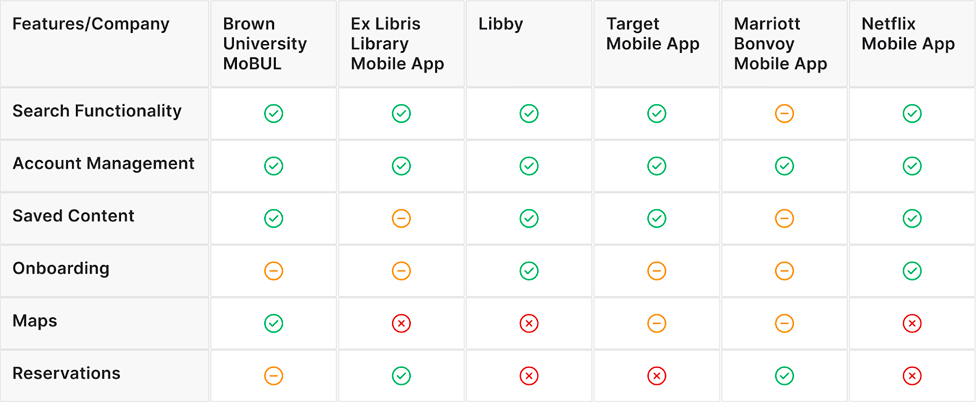
Our analysis of three comparator apps: Brown University’s moBUL, Ex Libris platform, and Libby highlight key takeaways for our project. moBUL provides features like specific course reservations, and “scan a shelf,” setting a high bar for custom campus-specific utility. The Ex Libris platform has very standardized functions: bookings, accounts, and search but often lacks distinctive branding. Libby offers a very user-centered design with its intuitive interface and engaging presentation of digital content.
From these findings we determined we would like MSU Libraries to adopt these features, merging intuitive core functionality with strong integrated academic tools, creating a uniquely valuable and universally convenient experience for the MSU community.
Our team deployed a survey to gather broad insights into how members of the MSU community currently interact with MSU Libraries’ physical and digital services. The survey was designed to identify the primary user groups and understand their current library use patterns and pain points.
At a high level, the screening survey was used to establish a baseline understanding of how students and other members of the MSU community currently interact with MSU Libraries, both digitally and in the physical library spaces. The survey allowed the team to identify broad patterns in usage, awareness, and pain points related to the library’s existing tools and services.
The survey was created on Qualtrics and distributed electronically to the MSU community with support from MSU Libraries. It included a mix of questions that covered demographic information, frequency/purpose of library use (online and in-person), device preferences for accessing library resources, prior experience with library mobile apps, and perceived value of potential mobile app features
Current Library Usage
Most respondents reported regularly engaging with MSU Libraries.
Activities at the Libraries
Primary reasons for library use included:
Device and Platform Prefrences
When accessing the MSU Libraries website:
Interest in Mobile App Features
When asked to select the most valuable potential mobile app features, respondents prioritized:
The survey results suggest that students are primarily engaging with MSU Libraries in ways that are often tied directly to coursework or other academic needs. Based on the responses, the library is frequently used as a study space and research resource; however, some awareness of the additional services (such as events) appeared limited. The team noted this as a potential gap between what the library offers and what users are actively recognizing and or accessing.
Using the results of the survey the team created an interview guide with the goal of better understanding how students discover the library’s services, what things may be preventing or challenging engagement, and which interactions would be most valuable to support through a mobile experience.
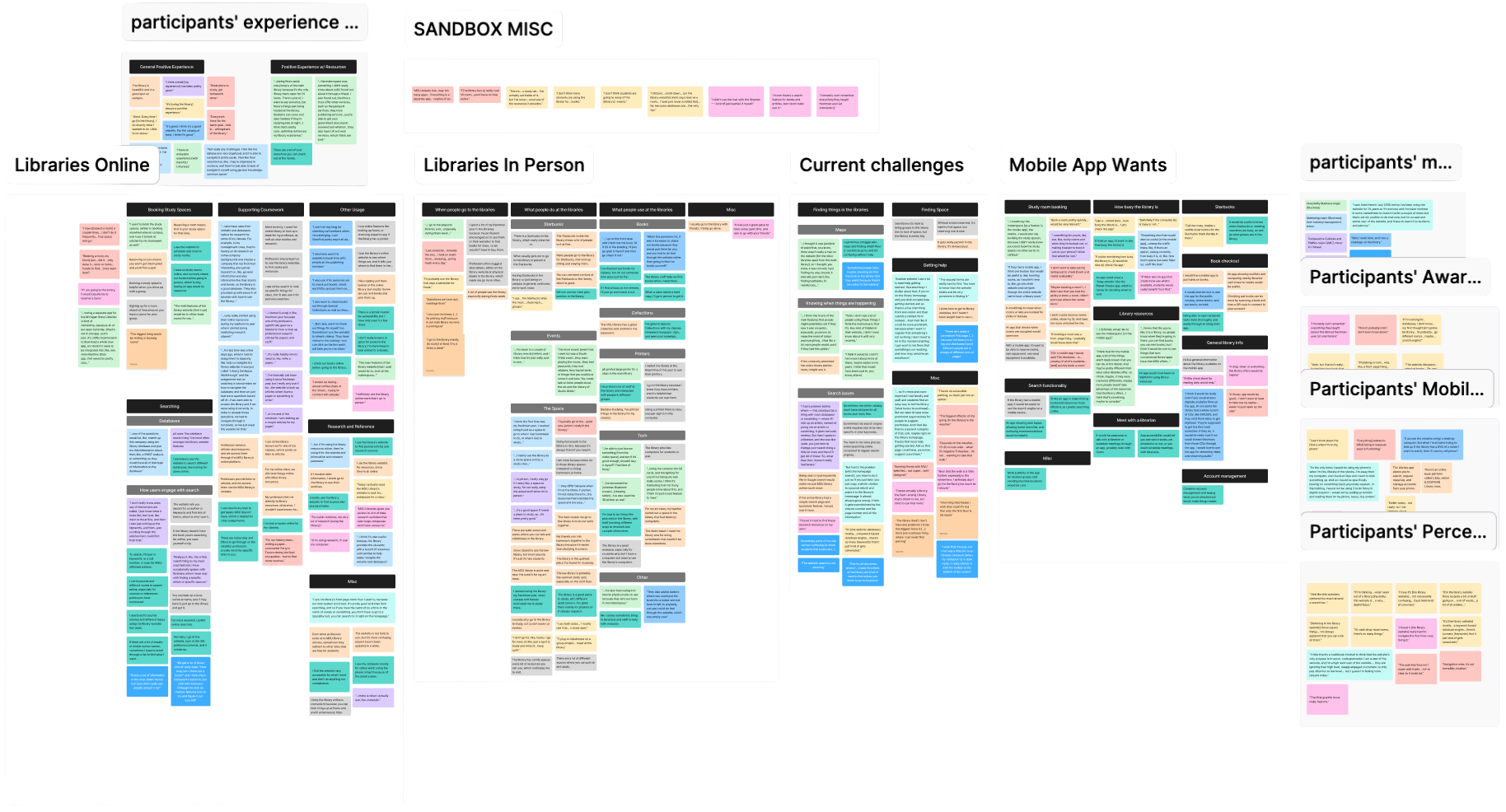
After receiving survey responses, our team conducted 14 semi-structured user interviews to gain deeper, qualitative insights into how members of the MSU community experience MSU Libraries. After completing and transcribing the interviews, our team conducted affinity mapping to organize participant feedback into key themes, patterns, and insights.
User interviews allowed our team to understand users’ current experiences, perceptions, and challenges with MSU Libraries, both online and in-person. Affinity mapping was used to synthesize the qualitative data gathered from interviews, which will ultimately inform user personas and journeys, feature prioritization, and a deeper understanding of our users.
Interview participants were recruited from survey respondents who indicated willingness to participate in follow-up research. Interviews were conducted using a semi-structured format based on our user interview guide, which is linked below. Interviews focused on topics including library usage habits, digital navigation experiences, barriers to accessing resources, and expectations for a potential mobile app. Each interview was recorded, transcribed, and cleaned.
From the affinity maps, the team was able to code the gathered quotes into current usage patterns, issues and concerns, and wishes for a mobile application.
Search Functionality
High Priority



Room Booking
High Priority


Awarness of Services & Events
High Priority


Physical Space Usage
Medium Priority


Item Checkout & Status
Medium Priority


The user interviews and affinity mapping shows that MSU students engage with the libraries in two distinct ways, in-person and online. Both methods of usage showed unique user needs and current challenges.
Students who engage with the libraries in person often note their main use case being using the space to study. These students often book rooms or just show up to the spaces to study on their own and with friends. Further, people go in person to use the various tech available (printers, computers, etc.) - especially when students are unable to complete tasks for class without library resources. Finally, people are drawn to the library due to the Starbucks within.
Students engaging with the libraries online often use the search feature to utilize online books, articles, and databases. Most students have had an experience where a professor has instructed them to use the libraries for readings or other reference. Students also will use the libraries online to book study rooms and get answers to FAQs.


Turner, the Task-Driven Student
Turner is a junior at Michigan State studying chemistry with minors in business and history. He lives off campus in an apartment and manages a demanding academic schedule that includes both STEM and writing-intensive coursework. Turner values efficiency and prefers tools and environments that help him focus and get things done quickly. While he regularly relies on MSU Libraries for his schoolwork, his engagement is largely driven by immediate needs rather than exploration of available services.
Age: 21
Year: Junior
Major: Chemistry
Traits: Analytical, Focused, Practical
In Person Library Use
Uses the library mainly as a quiet study space
Most likely to visit during exams or major project deadlines
Prefers quiet zones over social or collaborative areas
Reserves study rooms for group projects, often after seeing a peer do it first
Frequency of visits is influenced by weather and distance from campus
Digital Library Use
Uses library databases for history-related research assignments
Accesses digital resources almost exclusively on a laptop
Finds the website functional but not intuitive
Rarely explores features beyond what is required for class
Goals
Get academic tasks done quickly and efficiently
Find available study spaces
Access research materials
Meet with project groups
Locate a quiet place to focus, especially during exams or deadlines
Pain Points
Busy schedule makes it hard to justify walking to the library unless it feels “worth it”
Weather strongly affects library use, especially during colder months
Frustration with the number of separate MSU apps needed for different tasks
Limited awareness of available library resources and services
Avoids the library when it feels crowded, noisy, or overstimulating
Turner's Journey Map
Scenario
The user is preparing for midterms and needs a quiet place to study and access research materials efficiently.
Expectations
User is expecting to take a little while to find a study space and if none is available, they will go home.
Motivation
With exams and deadlines approaching, they decide they need a distraction-free environment to concentrate and make progress quickly.
Action
Review upcoming assignments and exams, decide whether studying at home is sufficient.
Pain Point
Weather makes travel less appealing, and there is uncertainty about how crowded the library might be.
Evaluation
Evaluating whether the time and effort to go to the library will meaningfully improve productivity.
Action
Checks library hours, consider distance, weather, productivity vs convenience.
Pain Point
Distance and weather makes them reluctant to go.
Search
Once arriving at the library, they look for a quiet place that allows them to focus without overstimulation.
Action
Decides to go for productivity, walks through quiet zones and reserves a study room.
Pain Point
Difficulty knowing where the quietest zones in the library are.
Research
They log onto their laptop to quickly locate specific databases or materials needed for assignments.
Action
Navigates library website, searches databases for research.
Pain Point
Website is functional but does not feel intuitive, and they have limited awareness of advanced tools and services.
Reflection
After studying, they evaluate whether the library visit improved productivity enough to justify the time and effort taken.
Action
Reflects on focus level, decides whether to return to study again for their next deadline.
Pain Point
Travel effort may outweigh benefits, and they are still unaware of broader library services that are hidden within the further pages of the site.
Key Insights
Limited visibility of services means value is often under-realized (rather than absent).
Crowding and noises are strong deterrents for users during high-stress periods.
Design Opportunities
One central live study space availability page.
Reduce friction in repeat visits (saved preferences, favorite zones).
Noise-level indicators by zone.

Angela, Experienced Librarian
With 14 years of librarian experience under her belt, Angela enjoys her busy days with her coworkers and her interactions with the students that come to the libraries to use their resources. She has been through several iterations of the currently-existing website and acknowledges that the site is in much better state than she had found it when she first arrived at her job, but always has thought about changes that might still be implemented to the site regarding simpler and straightforward tasks. She would like the experience of the library to be as smooth as possible in terms of connecting the staff with the students and other users.
Occupation: Librarian
Years of Experience: 14
Traits: Observant, Solution Oriented
Goals
Support students in becoming more self-sufficient when using library resources
Help others locate information within the libraries more efficiently and accurately
Find library materials (textbooks, course reserves, books) quickly and with minimal friction
Reduce time spent explaining basic library functions to users (particularly students)
Navigate between online search results and physical library spaces without confusion
Needs
A centralized, easy-to-find FAQ page on the site for basic library questions
Better wayfinding tools that connect search results to physical locations
Mobile-friendly tools for in-the-moment use inside the library
Pain Points
Library terminology (circulation, course reserves) is confusing or unclear to users
Website search results create visual clutter and require extra steps
Poor alignment between digital information (call numbers, maps) and physical navigation in the building(s)
Chat & Help features are not visually prominent enough for users, especially in dark mode
Interests
Improving accessibility and inclusivity in both physical and digital spaces
Tools that prioritize efficiency and clarity over visual complexity
Design solutions that reduce reliance on staff for basic questions
Mobile or app-based features that support quick lookups and navigation
Systems that will adapt to real user behavior, not just ideal workflows
Angela's Journey Map
Scenario
A student approaches the user and asks where they can find and check out a textbook quickly.
Expectations
Easily locate where the textbook is online and direct the student to pick out the item.
Initial Request
They are working at the front desk when a student approaches the desk and asks where to find a certain textbook for their class.
Action
Asks student for course number or title. Opens library website on desktop.
Pain Point
Students often don’t know exact course numbers.
Navigating
They move through the library website, deciding which search path is most likely to work while mentally filtering out cluttered or unreliable options.
Action
Navigates to Course Reserves, sometimes switching to Books & Media (more advanced search).
Pain Point
Information is buried multiple clicks deep and basic policies are hard to find.
Refine
While initial searches don’t immediately produce clear results, they adjust strategy, switching tools or search categories to locate the item.
Action
Checks call number and location.
Pain Point
Maps require orientation skills and there is digital-to-physical disconnect.
Follow-Up
After finding the textbook on the online system, they consider the physical library layout.
Action
Explains floor and basement layout, sometimes walk student to shelf.
Pain Point
Building layout may be confusing and requires librarians to leave desk to provide service.
Reflection
Once the book is located, follow-up questions from the student are answered, such as borrowing policies, returns, and other logistics that the student wasn’t able to find online.
Action
Opens lending policies page, searches for circulation info, or answer directly from self knowledge.
Pain Point
Students overly rely on librarians to answer rather than able to find things on site easily.
Key Insights
Friction is mostly caused by terminology + information architecture.
Small usability gaps create repetitive staff workload.
Design Opportunities
Reduce reliance on library-specific jargon for students so that they may find things more easily (perhaps change labels to more commonplace words).
Make essential information visible sooner and more clearly within search results.

Jordan, the Research-Savvy Student
Jordan is a senior at Michigan State pursuing a double major in Political Science and Sociology, with plans to continue their education in law after undergrad. They live on campus in a residence hall and balance a schedule that involves extensive reading, long-term research projects, and independent study. Jordan relies on MSU Libraries as a key resource for finding specialized materials, accessing databases, and consulting with librarians, rather than for casual study. Jordan’s library use is deliberate and goal-oriented: they plan visits around specific materials, archival access, or database research, and they engage deeply with the tools and resources available to support complex academic work.
Age: 22
Year: Senior
Major: Political Science, Sociology
Traits: Methodical, Persistent, Detail-Oriented
In Person Library Use
Visits the library specifically to access physical collections, archives, or specialized materials
Uses reference desks and consultations when stuck or refining research questions
Material availability is crucial to their projects and their time when planning to visit the library
Uses the library as their research environment, not just a study location
Digital Library Use
Regularly accesses discipline-specific databases, journals, texts, collections, et cetera
Needs to utilize advanced search filters, subject headings, and citations
Finds the website functional once they got the hang of it, but struggled a lot initially with the terminology of the site
Wants to be able to access materials remotely easily, and desires an almost-seamless off-campus process
Goals
Locate high-quality, authoritative sources for their research projects
Conduct research efficiently without duplicating effort
Stay organized and methodical throughout their long research weeks
Confidently meet academic standards for evidence and citations
Pain Points
Inconsistent access to materials across platforms
Had a hard time getting started with location research material in the beginning of their library journey (terminology was difficult)
Time lost when navigating between multiple systems across the libraries
Jordan's Journey Map
Scenario
The user is beginning a research project on urban environmental policy for one of their courses and needs to efficiently gather sources.
Expectations
Precisely and efficiently gather the sources needed to begin the project.
Brainstorm
They identify what kinds of materials are needed for their research and considers where to find them.
Action
Search the library catalog, check databases, browse library website.
Pain Point
Hard to immediately identify the most relevant databases or archives.
Plan
They decide when to go to the library, and which areas to use based on resource availability and project needs.
Action
Check study room availability, quiet zones, and plan visits during less crowded times.
Pain Point
Limited awareness of special collections hours or reservation policies; planning takes more time than desired.
Access
They gather books, articles, and archival materials for the project. They want precise searches and direct access.
Action
Use databases and library catalog to request books, access archives, and retrieve digital copies.
Pain Point
Navigating physical archives, despite their experiences, can still be confusing especially because of physical location.
Synthesize
They organize and evaluate collected resources in order to support their research question.
Action
Takes notes, bookmarks articles, integrates found sources into project draft.
Pain Point
Managing multiple formats (databases, printed articles, PDFs and more) is burdensome.
Follow-Up
After reviewing initial materials and adjusting their research plan, they identify gaps in the process.
Action
They will consult librarians for more specific actions if needed in the future.
Pain Point
Discovering missing materials later on would slow down their progress.
Key Insights
The user’s needs go beyond study areas and center on access to specialized resources, as well as depth and precision when it comes to them.
Even advanced users experience friction when discovery pathways can be confusing or unclear.
Design Opportunities
Clear, centralized schedule and alerts for special collections or equipment availability.
Step-by-step guidance for accessing specialized physical collections once inside the library.
With metrics gathered from our user research study, and user personas and journey maps created for our various user groups, the team had everything needed to propose general features for the app.
Search Functionality
Similar to searching through library catalogs on the web, users are interested in having similar functionality on a mobile app. Within this feature, users are interested in the ability to use search filters, save items for later, and preview the content within the found item.
5/6 Competitors have some kind of search functionality as a major feature of the app.
71% of our survey takers access online articles and databases & 63% showed interest in searching the library catalog from a phone.
8/14 participants actively use the website for searching for reference materials & 2/14 participants mentioned wanting a search feature on a mobile app
Account Status
Users are interested in the ability to see what the status of their library account is on a mobile application. This would allow for users to know what books, articles, or other items are currently checked out by the user, check on hold times, or renew items.
All 6 Competitors have a centralized location for account management.
47% of survey participants borrow physical materials, 47% of participants would like a mobile app to view checked-out items and due dates, & 44% of participants would like a mobile app to manage accounts and renew books.
6/14 participants mentioned using the libraries to check out books or other resources & 3/14 participants would like a mobile app to put holds on items and check account status.
Reserving Physical Spaces
Users are looking to book rooms on the mobile app. Students will need to see which rooms they can book, where those rooms are located, and reserve at a specific time.
Although not a common feature within our comparative analysis, this does exist within 2 of the competitor applications.
46% of users use the libraries to find a quiet place to study & 56% of users showed interest in booking rooms at the libraries.
5/14 participants actively use the website for booking study rooms & 8/14 participants would like to see a room booking feature on a mobile app.
Accessing Library Information
Students are interested in knowing more about the libraries in general, like what can be rented, when events are happening, and how to get help.
Although this was not a direct comparison made, 2 of the competitors have some sort of onboarding experience for new users.
48% of surveyed users showed interest in viewing library hours and location details.
8/14 participants feel they are unaware of library events and services & 6/14 participants feel they would benefit from knowing more general library information & resources on a mobile app.
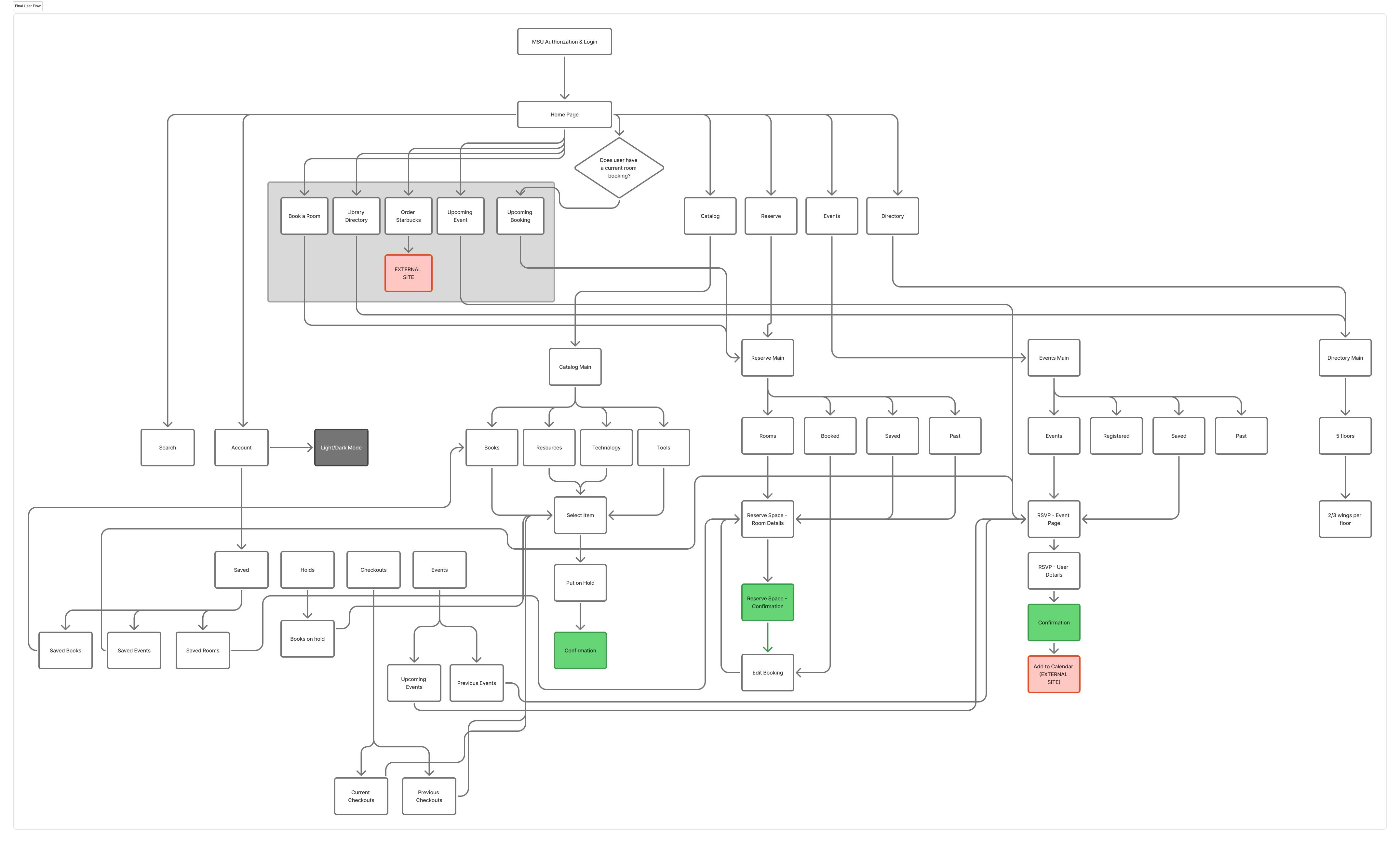
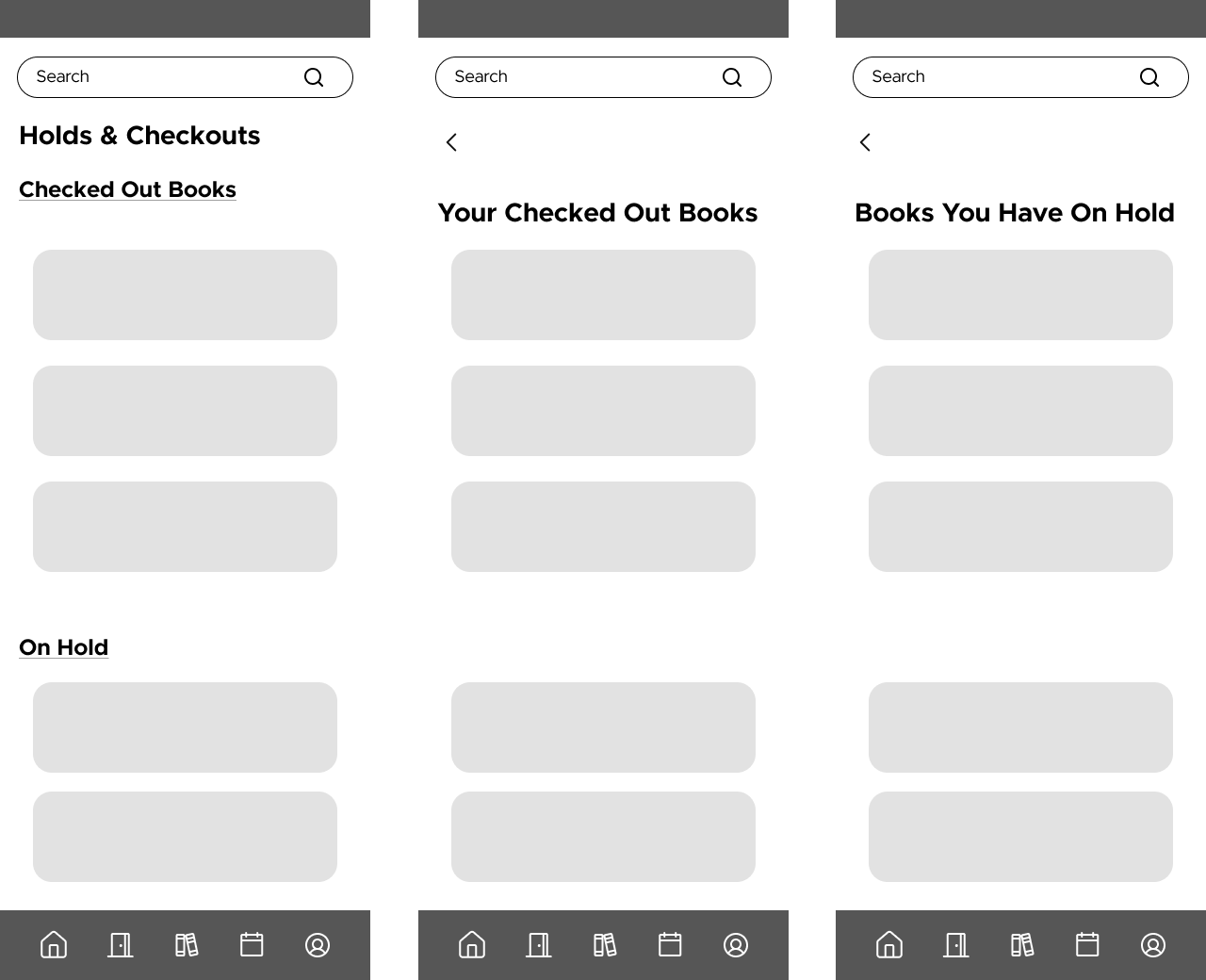
Using these requirements as our foundation, we moved into the low-fidelity design phase. We began by mapping out the overall structure of the app through a user flow diagram, which helped us determine the five main navigation pages: Home, Library, Booking, Calendar, and Account. Each corresponding to a distinct user need identified in our research. From there, we translated the user flow into low-fidelity wireframes, making early design decisions about layout, content hierarchy, and feature placement.

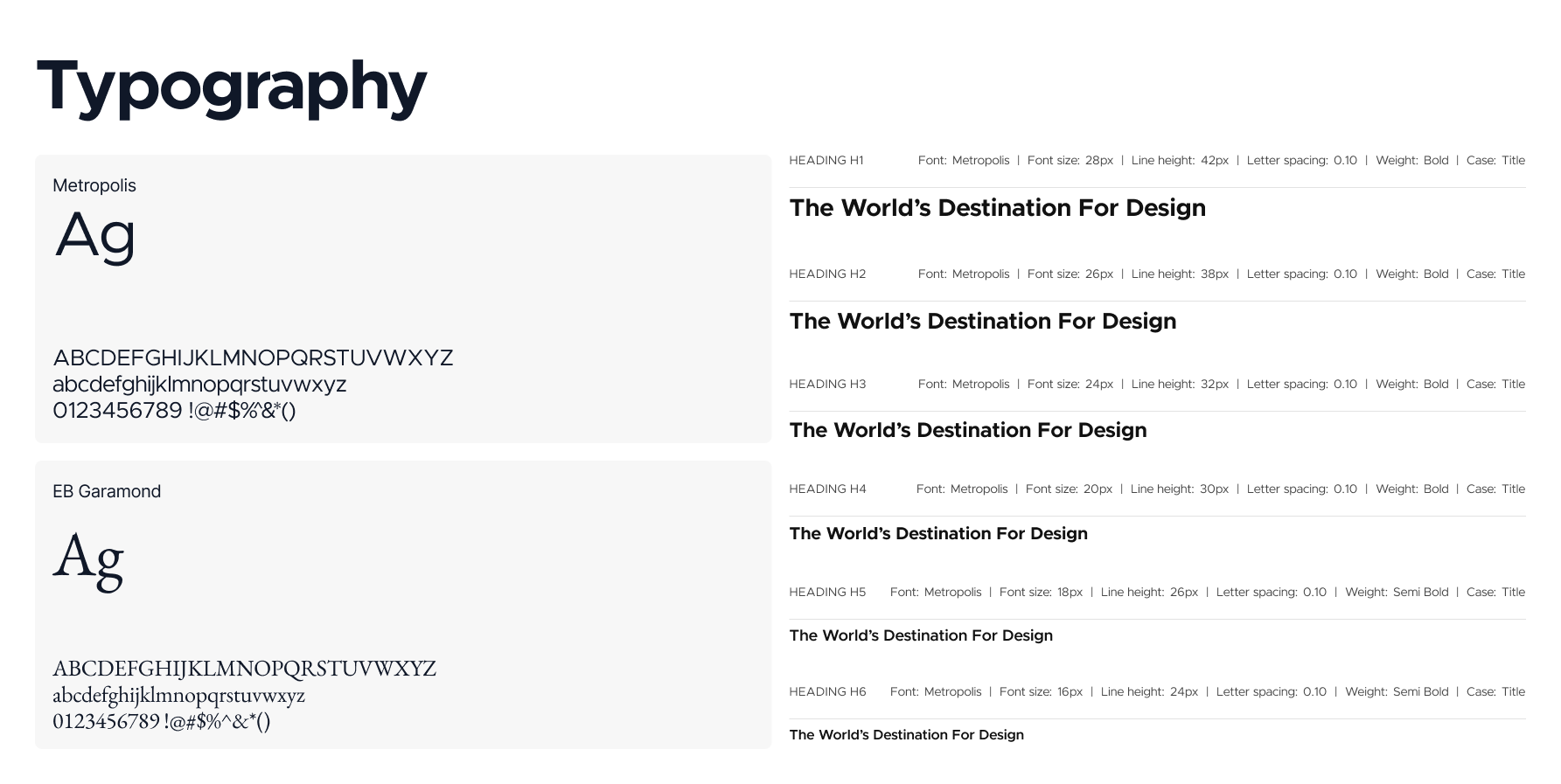
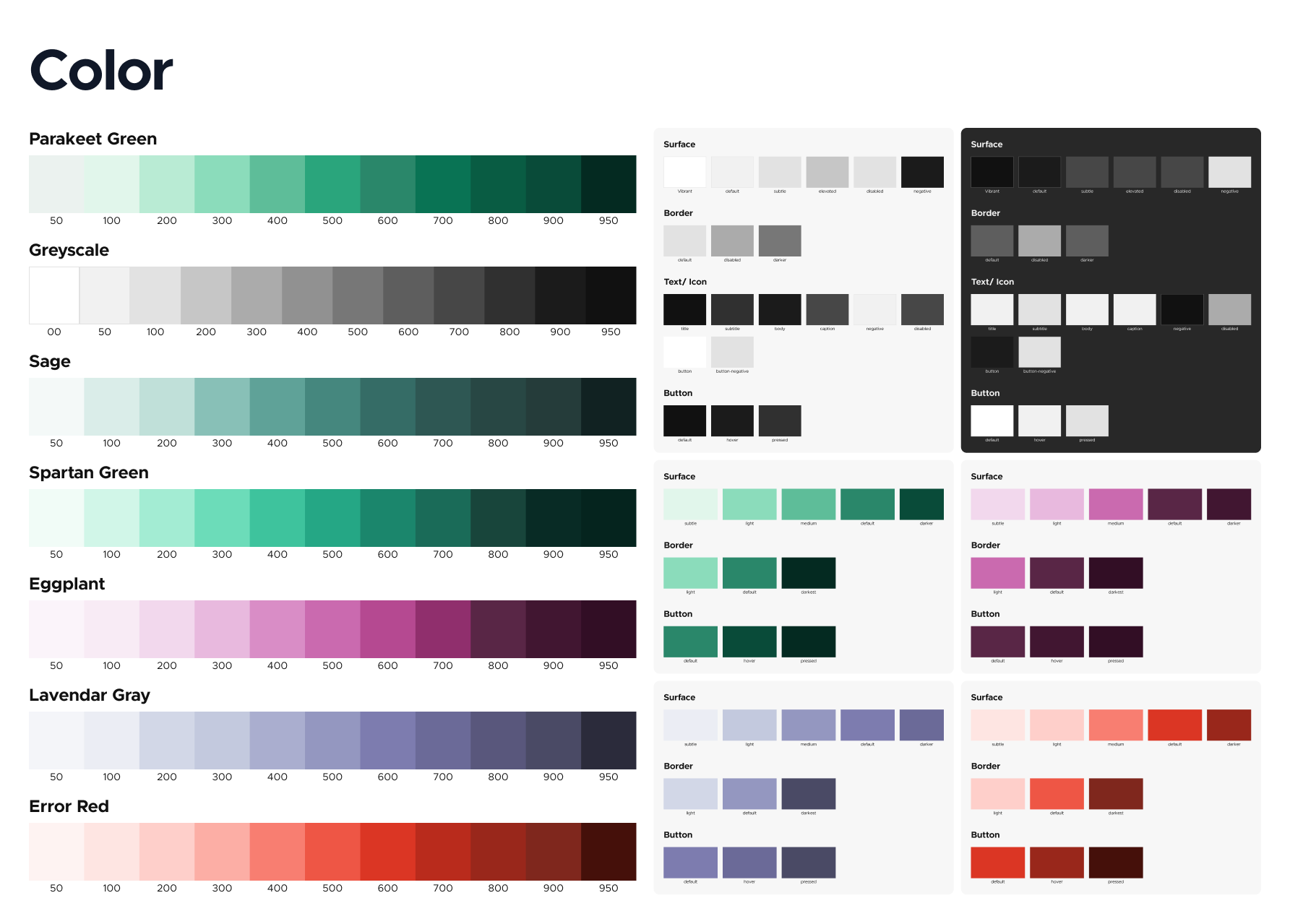
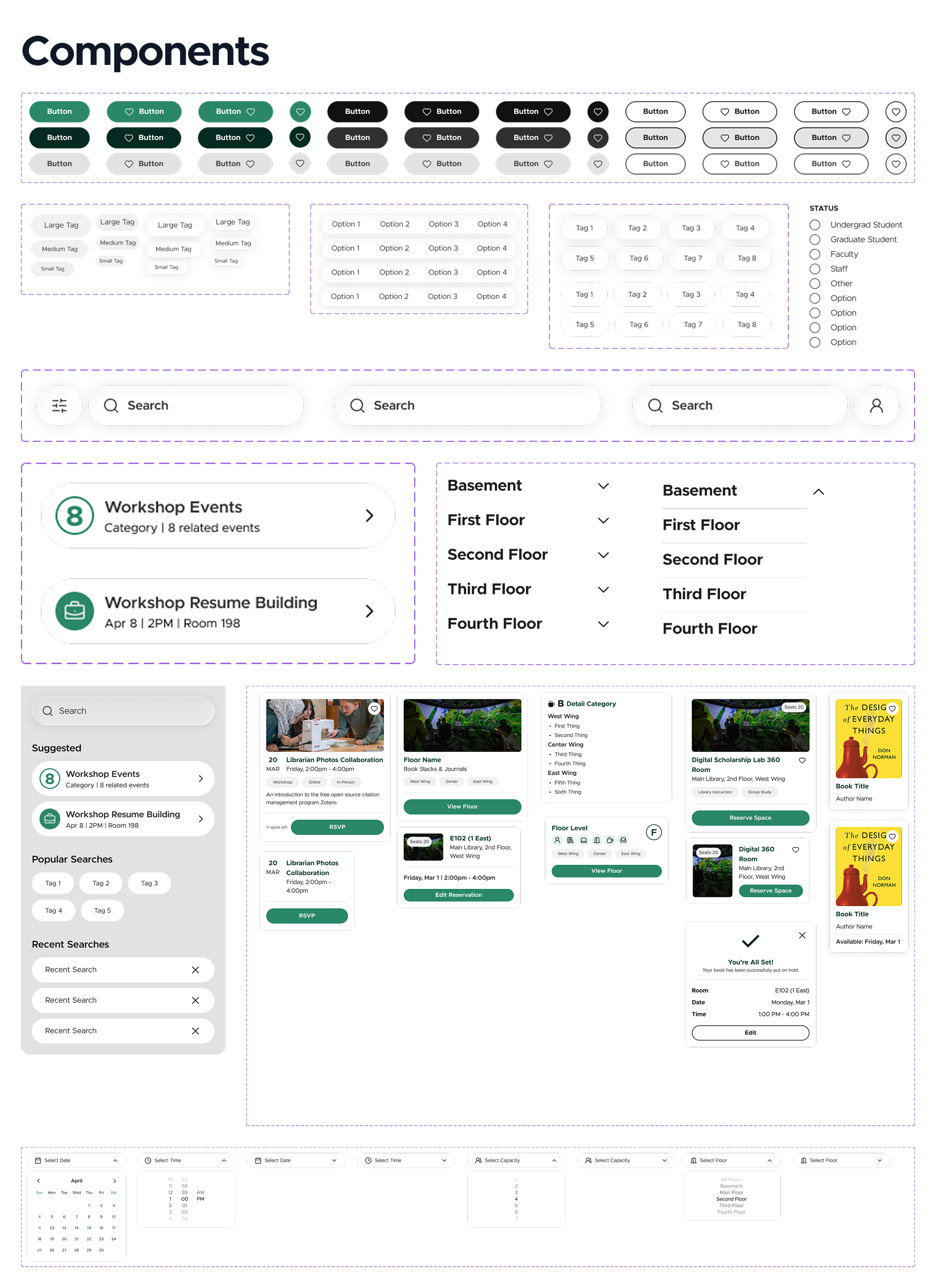
While beginning on low fidelity sketching and wireframes, the team also focused on building out the design system for the app. Since the MSU Libraries team already has a full design system for their website, the primary goal was to refine that system to work in a mobile app. This also required the team to replicate the system within Figma, as the previous system only existed on the branding page of the website.


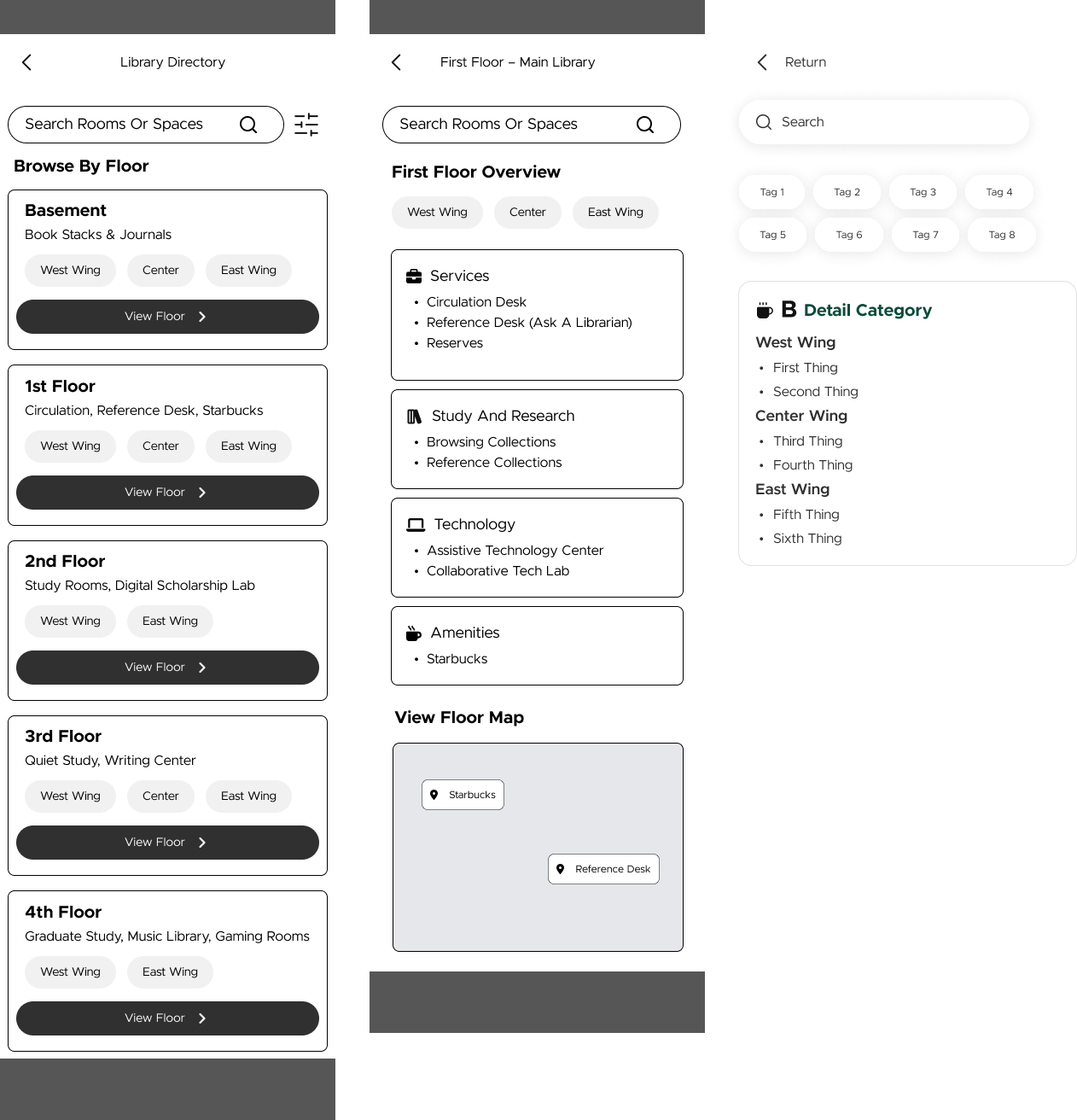
To begin the design process, our team discussed the core features that would define the app's structure, starting with what pages would appear on the main navigation bar. After evaluating the primary needs of MSU library users, we determined that six key pages would make up the navigation: Home, Catalog, Reserve, Events, Directory, and Account. Together, these pages cover the full range of tasks a student or faculty member might need, from discovering books and reserving study rooms to tracking events and managing their account.
Home Page Designs
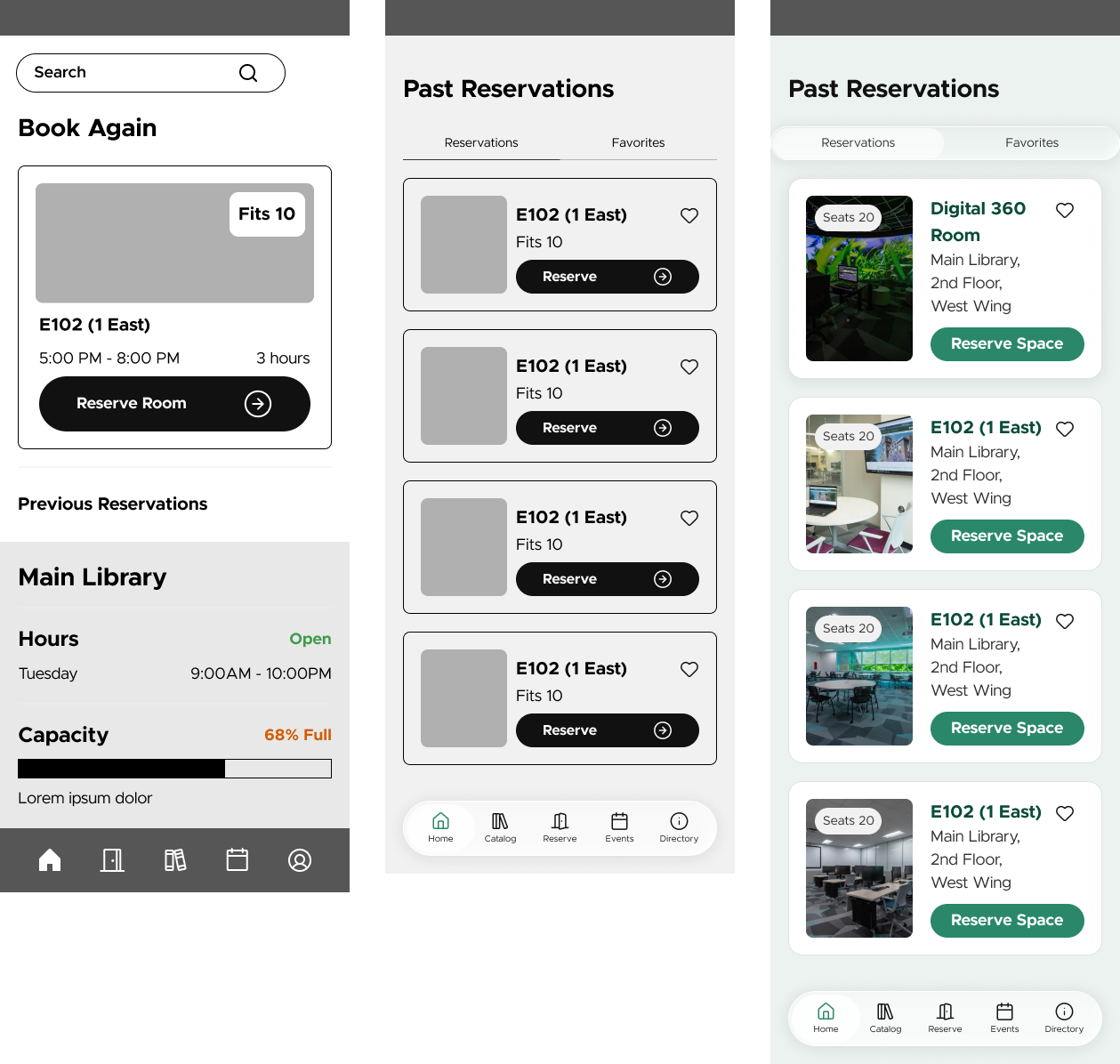
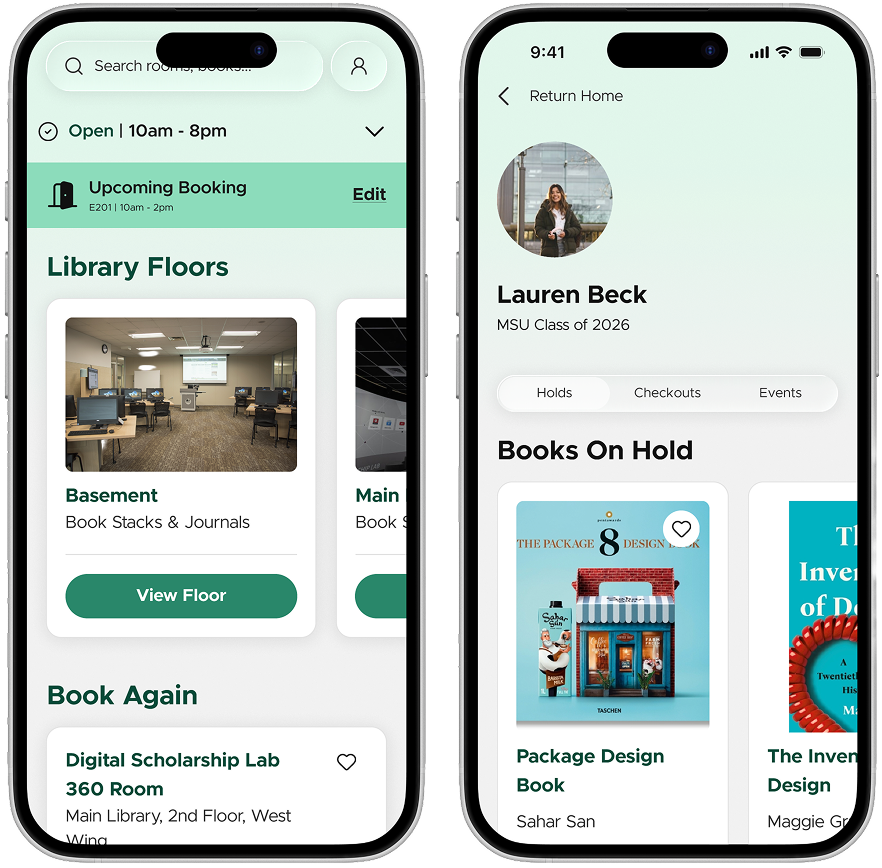
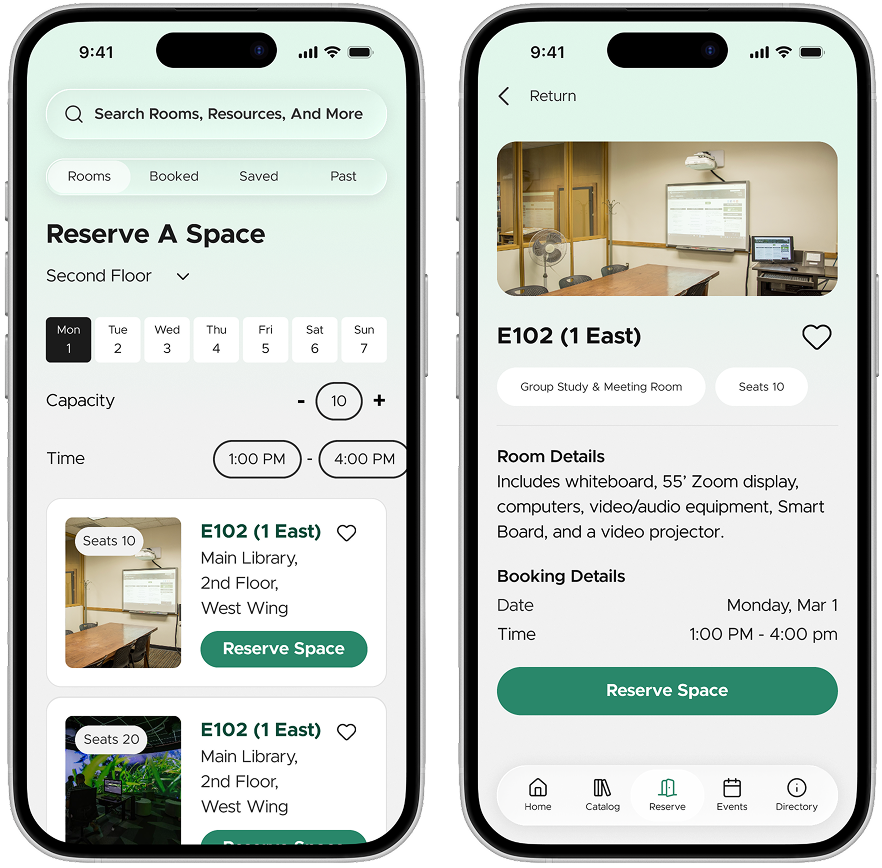
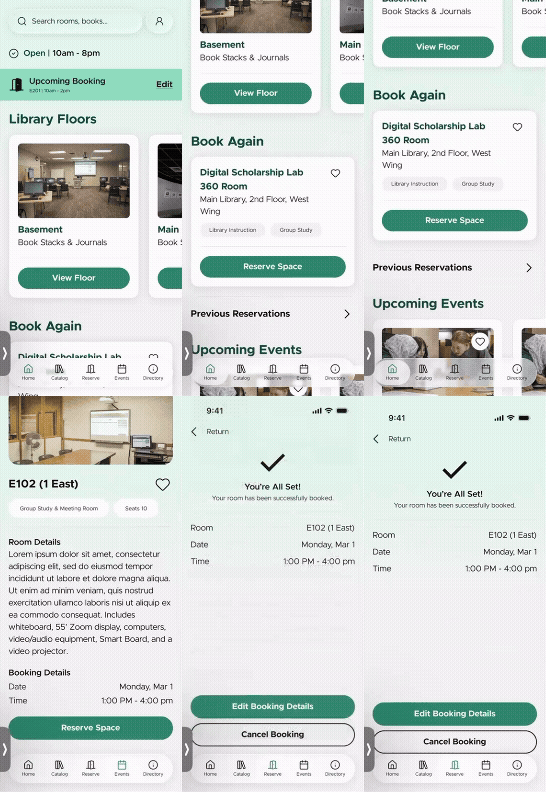
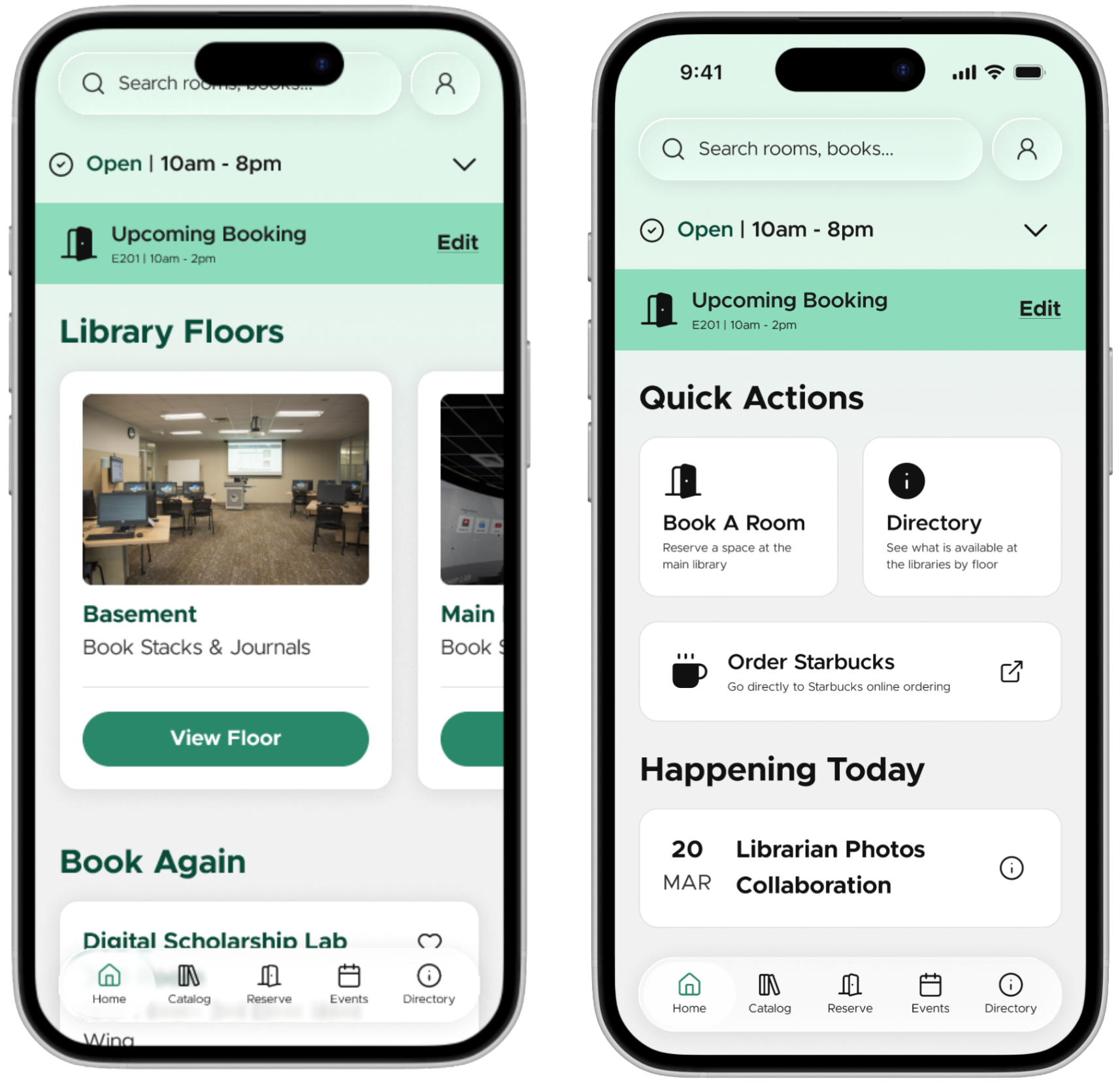
We designed the Home page to serve as the central hub and quick-access dashboard of the app. After MSU authentication, users land here first. Our research findings highlighted that room booking is one of the most essential aspects of the library experience for students, who expressed a strong desire for an accessible and efficient platform to reserve study rooms. With this in mind, our first major design decision was to feature a Book Room CTA prominently on the Home page. Beneath it, we included a section that allows users to quickly rebook the last room they previously reserved, reducing friction for repeat users. During this process, we experimented with the naming of this section, producing two versions: one labeled "Book Again" and the other "Past Reservations", to explore which wording would feel most intuitive to users. We also added a Library Directory CTA that surfaces general information about the main library, including real-time hours and current capacity, giving users an at-a-glance view of library status before they even step on campus. Finally, we incorporated a search function for quick lookups, ensuring that users who know exactly what they are looking for can navigate the app efficiently from the moment they open it.

Catalog Page Designs
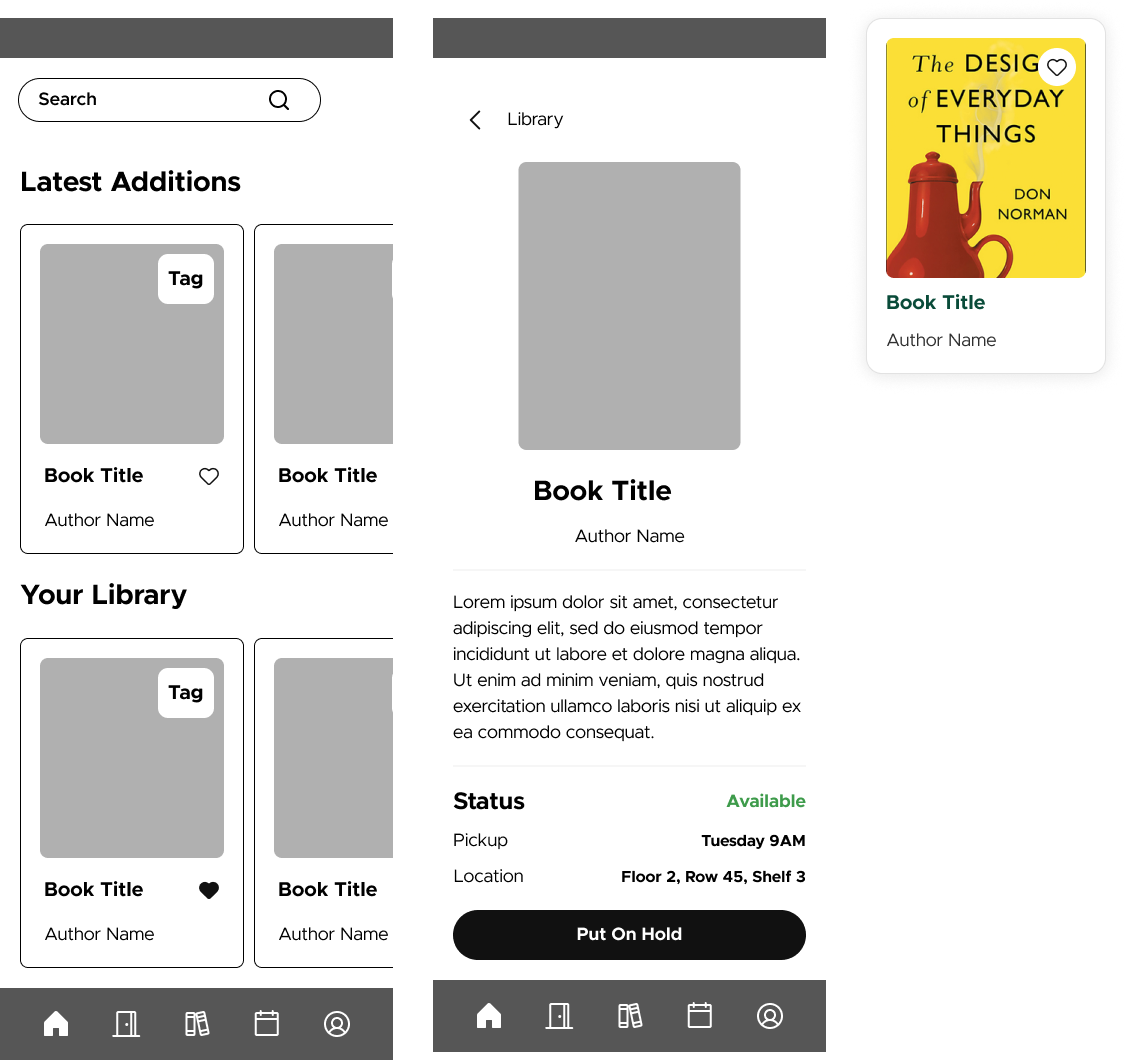
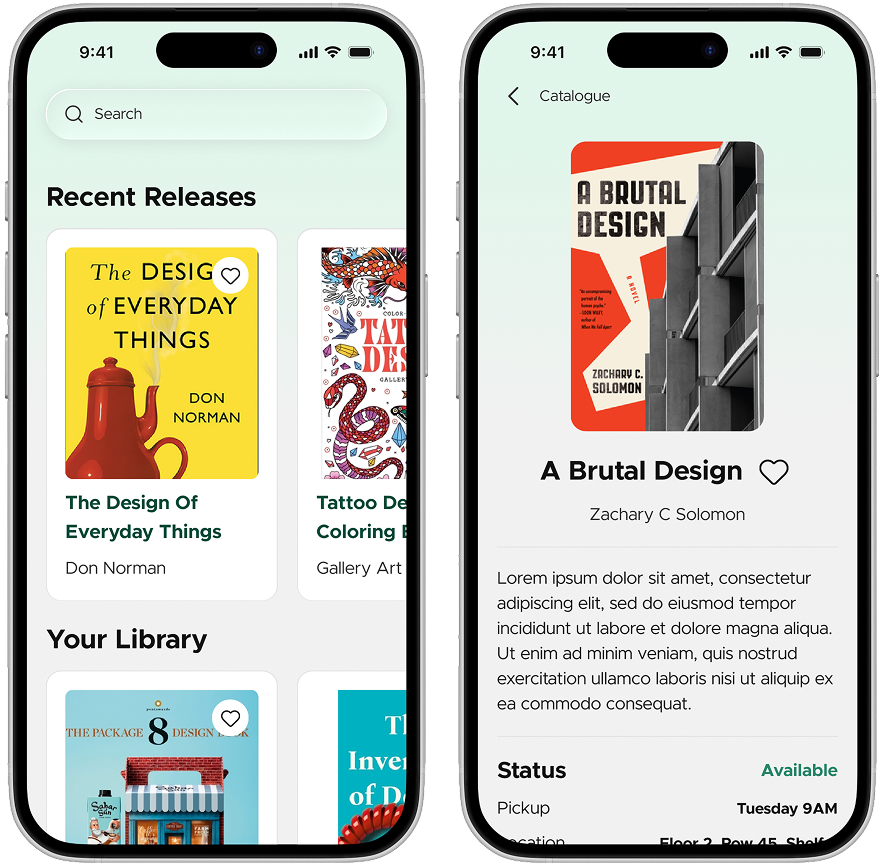
The Catalog page has the app's content discovery section, centered around the book catalog. From here, users can search for titles and navigate to a product page for a specific item. One of our key design decisions for this page was to include the physical location of the book within the library directly on the product page, helping users actually locate the item once they are on-site. In this way, the Caltalog page essentially functions as an in-app version of the existing catalog on the MSU Library website, but with the added convenience of being accessible from a mobile platform.

Reserve Page Designs
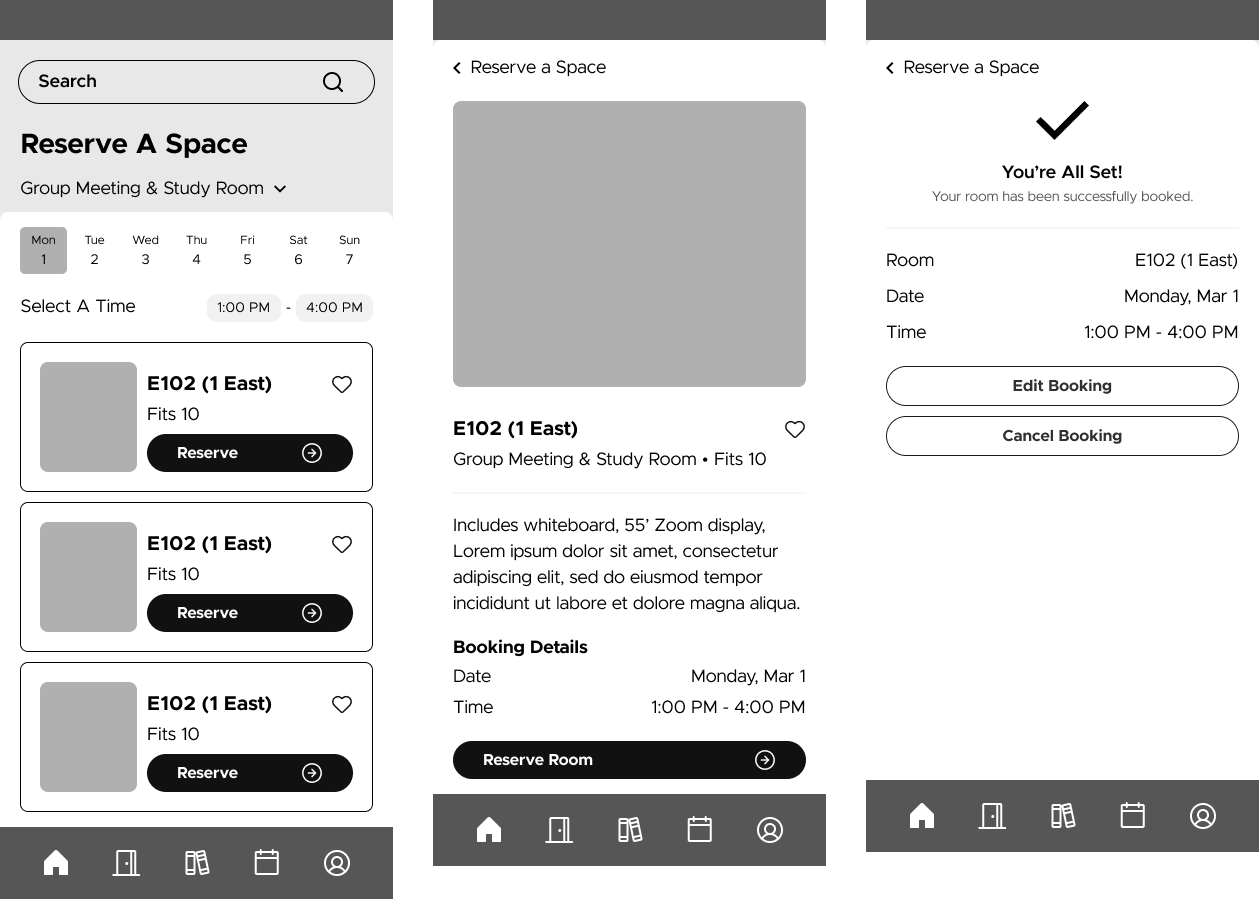
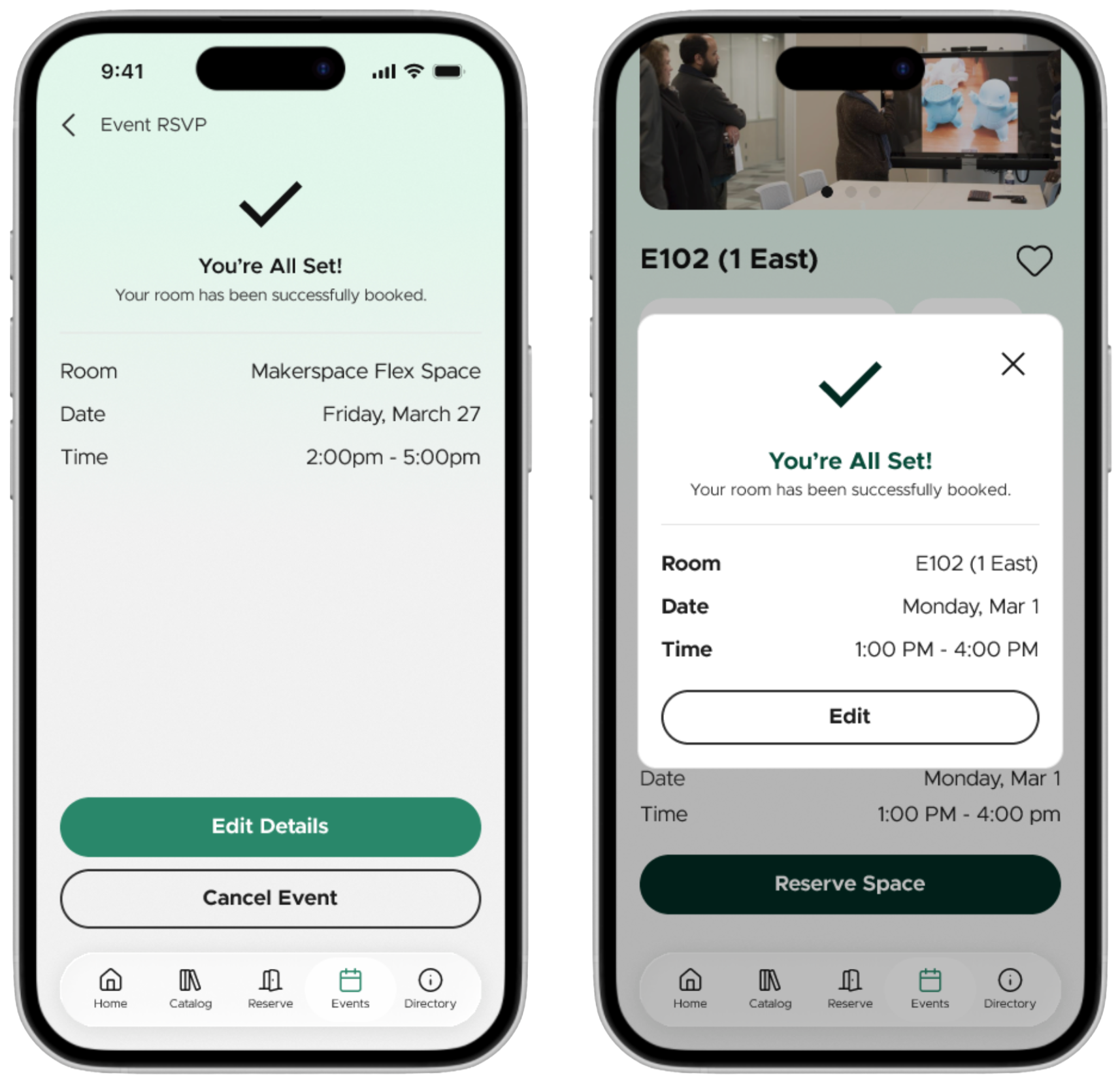
We designed the Reserve page to handle room reservations through a structured flow. Users first select a date and time, then choose which library location they want, followed by a specific room, and finally receive a confirmation with the option to add the booking directly to their calendar. We also incorporated a feature to store booked rooms, saved rooms, and past bookings, which would allow repeat users to move through the booking flow more quickly without having to re-enter the same preferences each time.

Events Page Designs
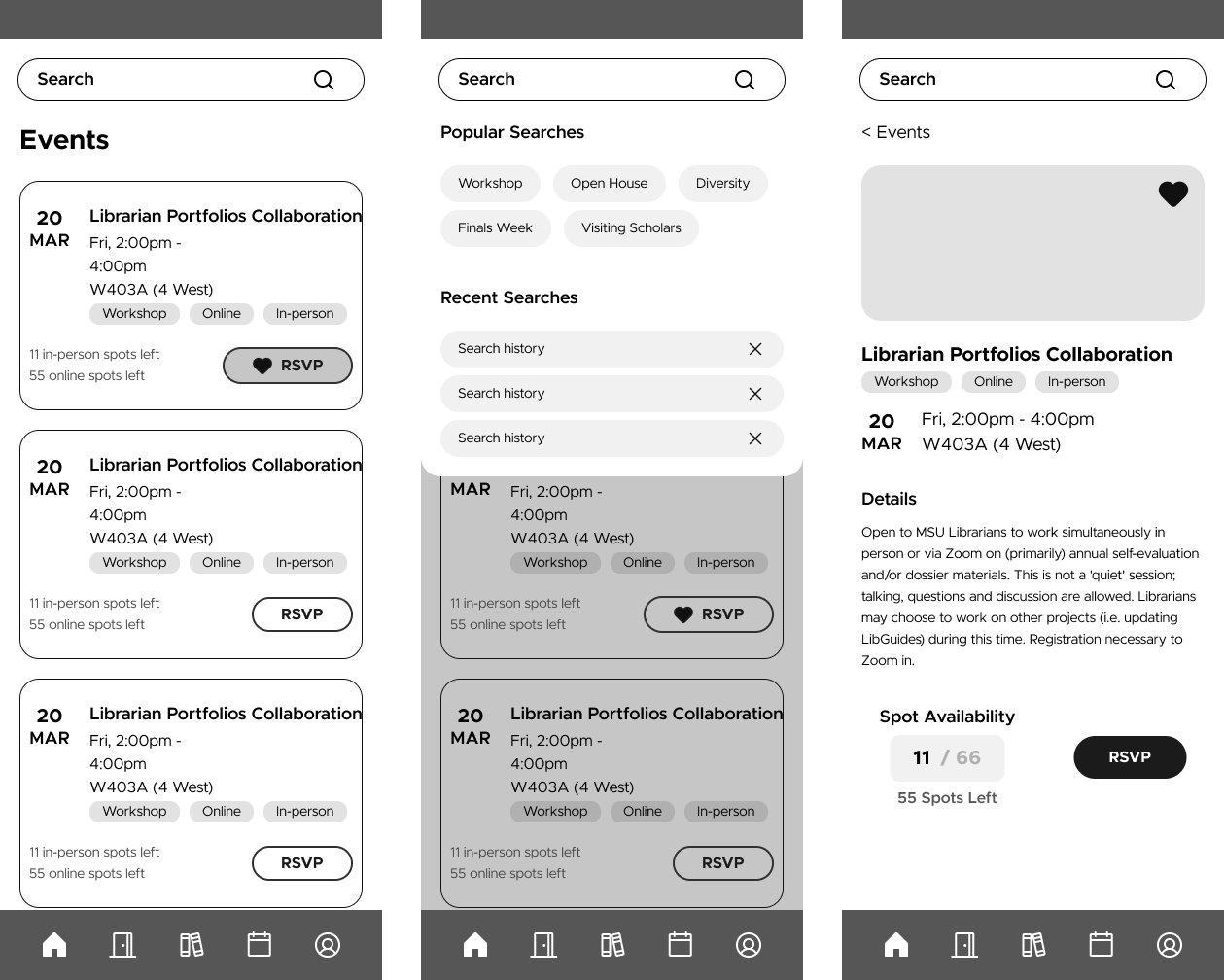
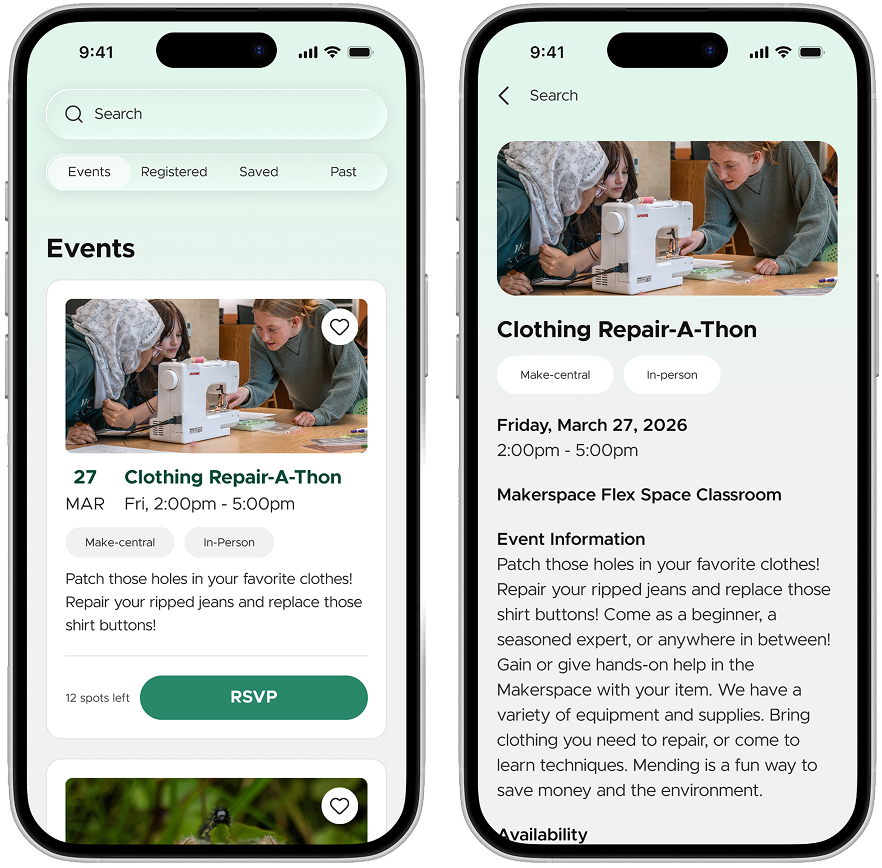
The Calendar page is the event discovery and RSVP section. Users can browse and search upcoming events, view an individual Event product page with details, RSVP to events they're interested in, and add them to the saved event calendar.

Directory Page Designs
The Catalog page has the app's content discovery section, centered around the book catalog. From here, users can search for titles and navigate to a product page for a specific item. One of our key design decisions for this page was to include the physical location of the book within the library directly on the product page, helping users actually locate the item once they are on-site. In this way, the Caltalog page essentially functions as an in-app version of the existing catalog on the MSU Library website, but with the added convenience of being accessible from a mobile platform.

Account Designs
The Account page is the user's personal profile and activity hub. It provides a general login overview, a view of what the user currently has checked out or on hold, and a summary of their upcoming bookings and events.

With low fidelity designs and a design system completed, it became incredibly easy to create a first draft of high fidelity designs with a working prototype.
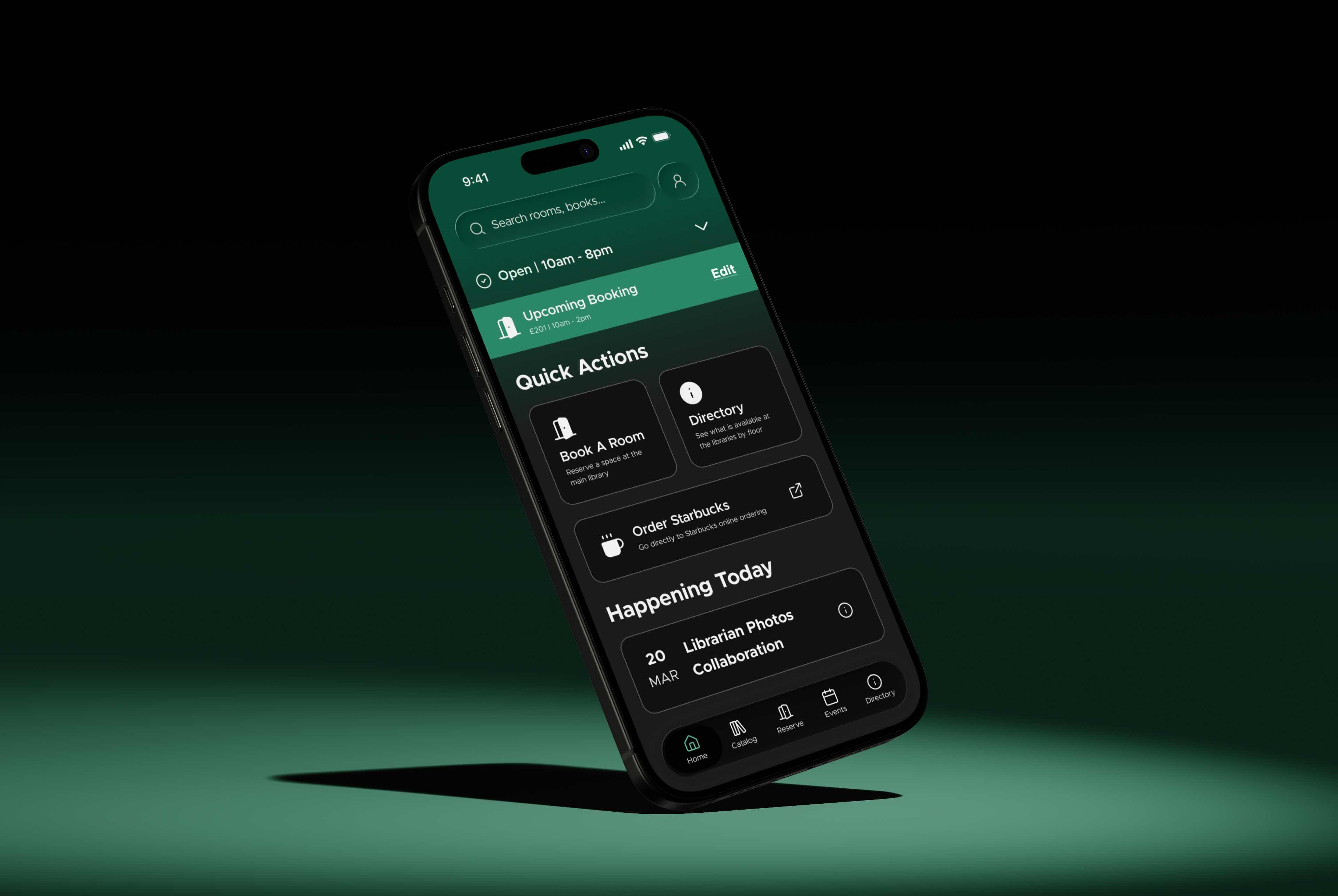
Home Page Designs
The homepage provides quick and efficient access to the actions and services they use the most frequently. At the very top, a status card shows whether the Main Library is currently open. This directly responds to the 48% of survey respondents who expressed interest in quick access to library hours, answering the most common pre-visit question before the user completes any further activities. Rather than requiring users to dig through layers of information, the home page displays the most relevant information immediately. Furthermore, account access was deliberately placed here rather than in the navigation bar as we wanted to reinforce our observed idea that checking account status is a fast, recurring task, as opposed to a dedicated destination.

Catalog Page Designs
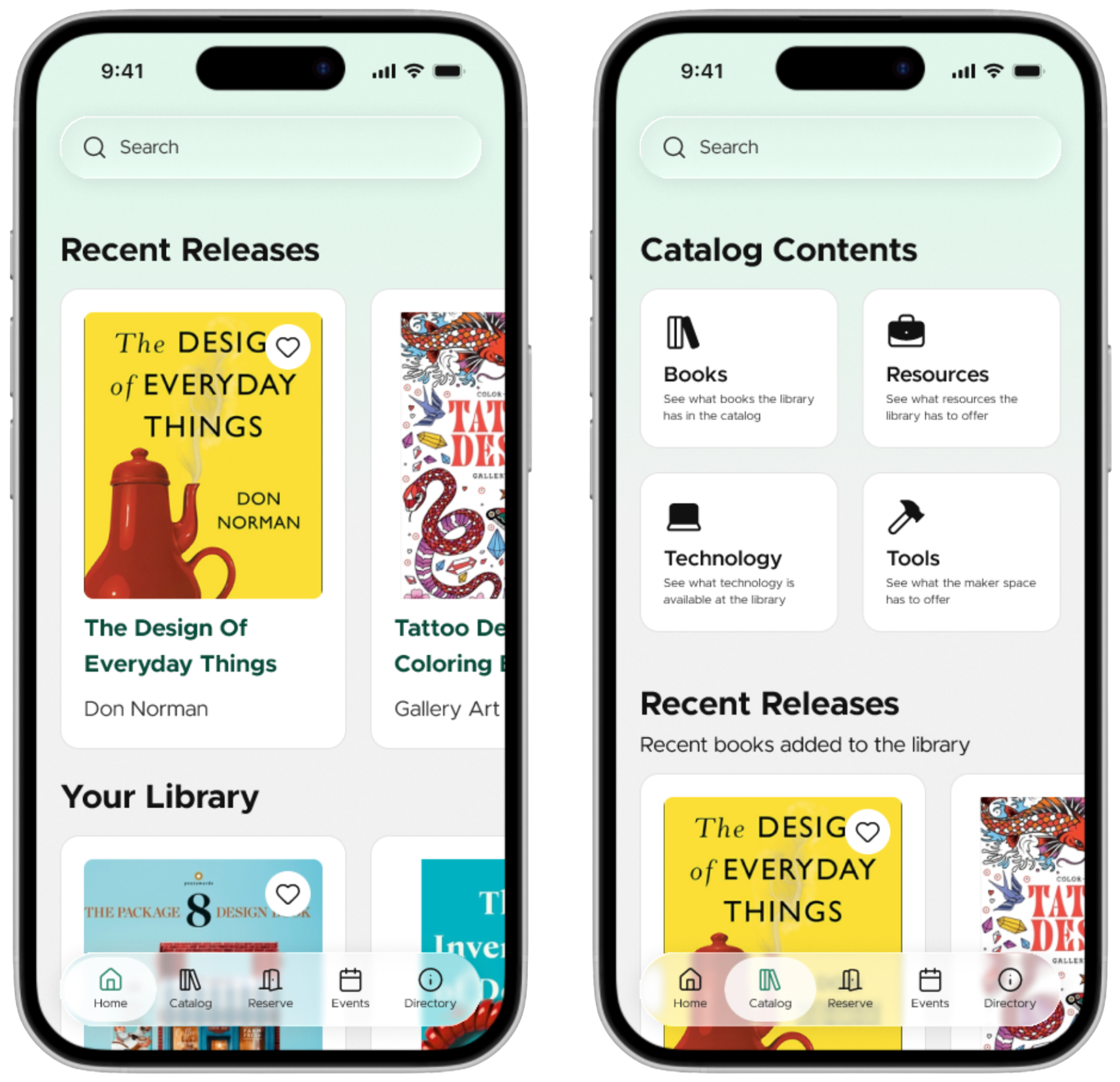
The Catalog page organizes content into four sections: Recent Releases, Your Library, Popular Picks, and Top Rated. Saved items are accessible via a heart icon on each card, a feature requested explicitly in user interviews. The book detail page prominently displays the cover, author, a description, physical location (Floor, Row, Shelf), and availability status, giving users all the information required to decide whether or not to check out a book. Placing “Put On Hold” and “Hold Waitlist Spot” as a persistent bottom action button reduces the steps required to complete a task. Users can also edit or cancel a hold directly from the confirmation screen, avoiding the need to navigate back through the flow.

Reserve Page Designs
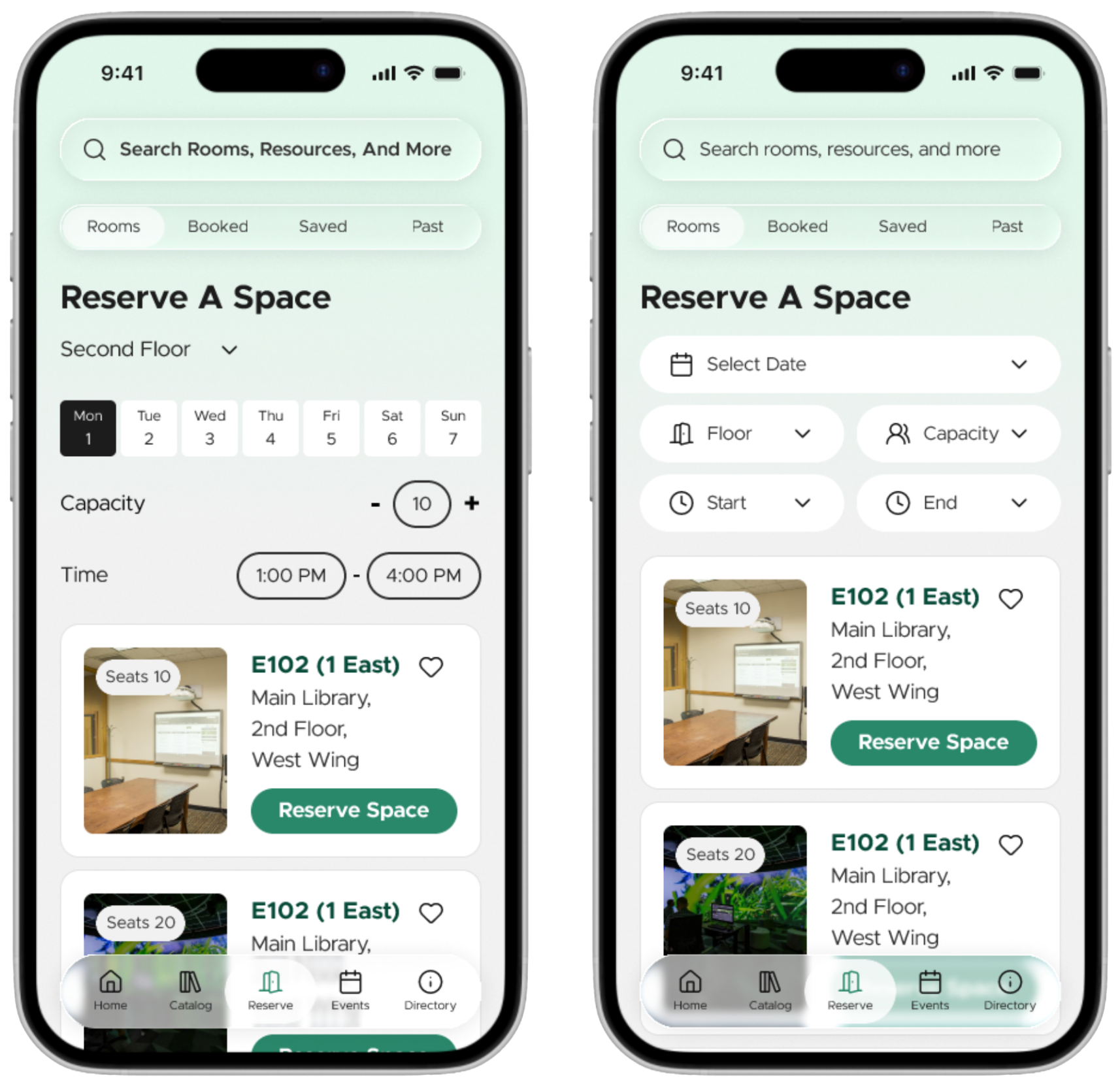
Room booking was the most requested feature in affinity mapping, with 8 of 14 interview participants explicitly calling for it, and 56% of survey respondents expressing interest. The page allows users to find and reserve study spaces with filters for floor, group size, and real-time availability, which were all additions made in direct response to peer feedback during class.

Events Page Designs
8/14 participants feel they are unaware of library events and services. By giving events their own dedicated page, the design makes library programming visible and accessible rather than buried on a website. An events-dedicated page encourages users to seek out library services and programming and provides a quick and easy way to register.

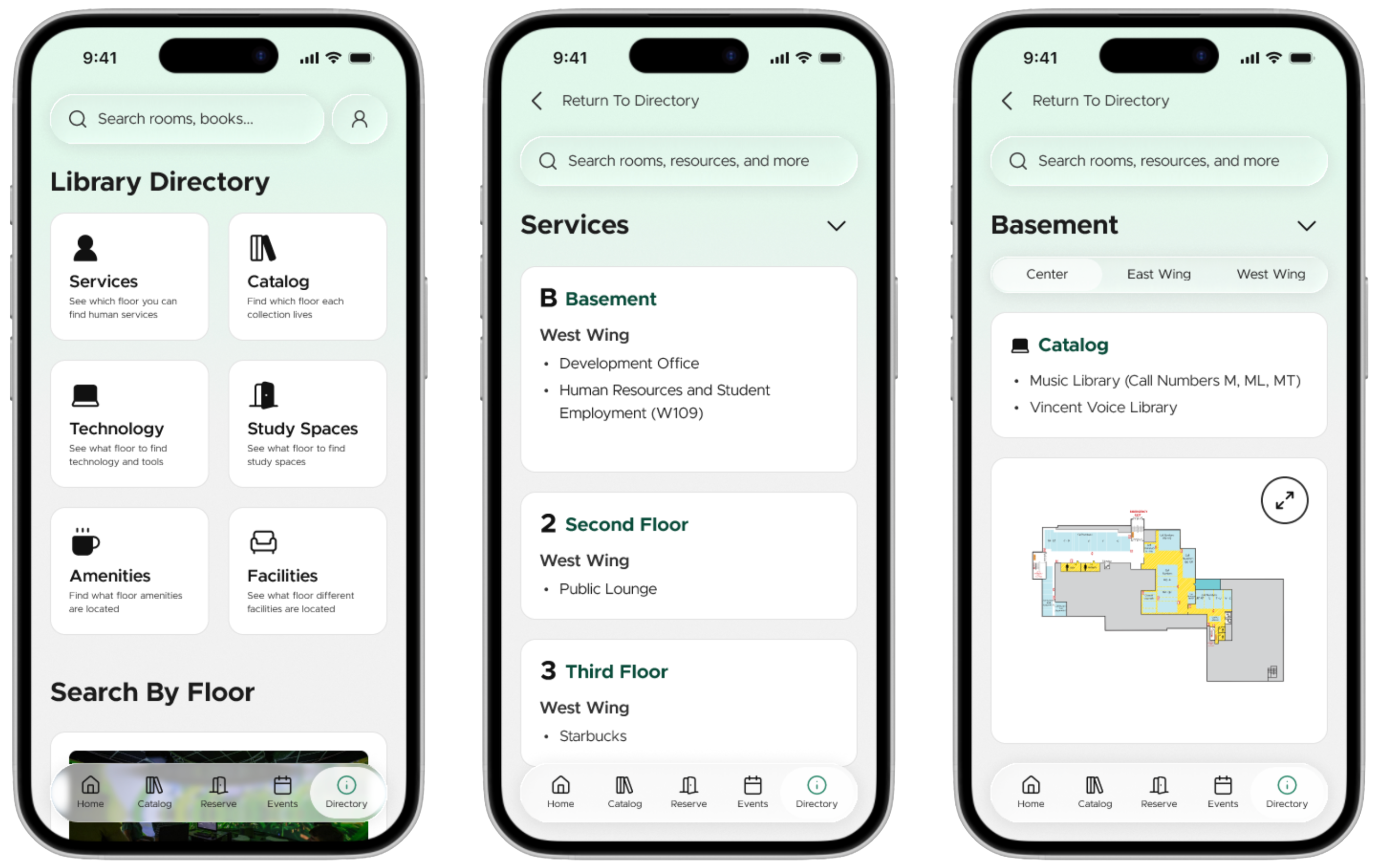
Directory Page Designs
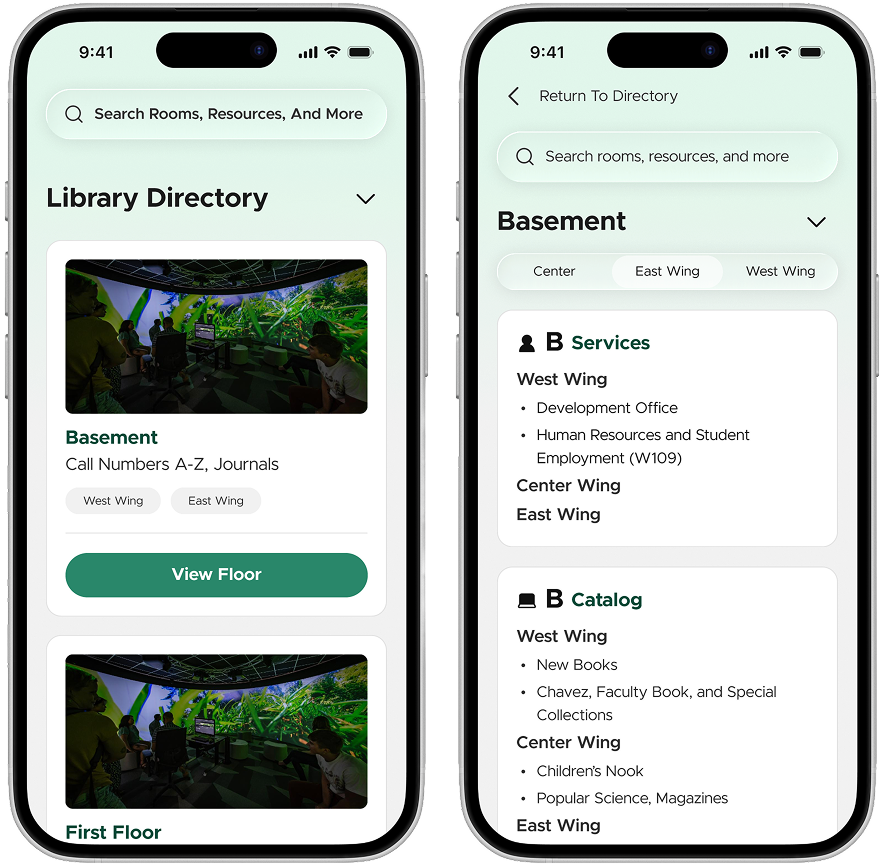
Directory final page design provides a comprehensive directory and map of the library. As the physical space is large, we separated it into floors and wings (east, west, central). A floor dropdown switcher replaced back-and-forth navigation, reducing the number of taps required to move between floors. Practical details like gender-accessible restroom locations were added following peer feedback to better serve users navigating the building in real time.

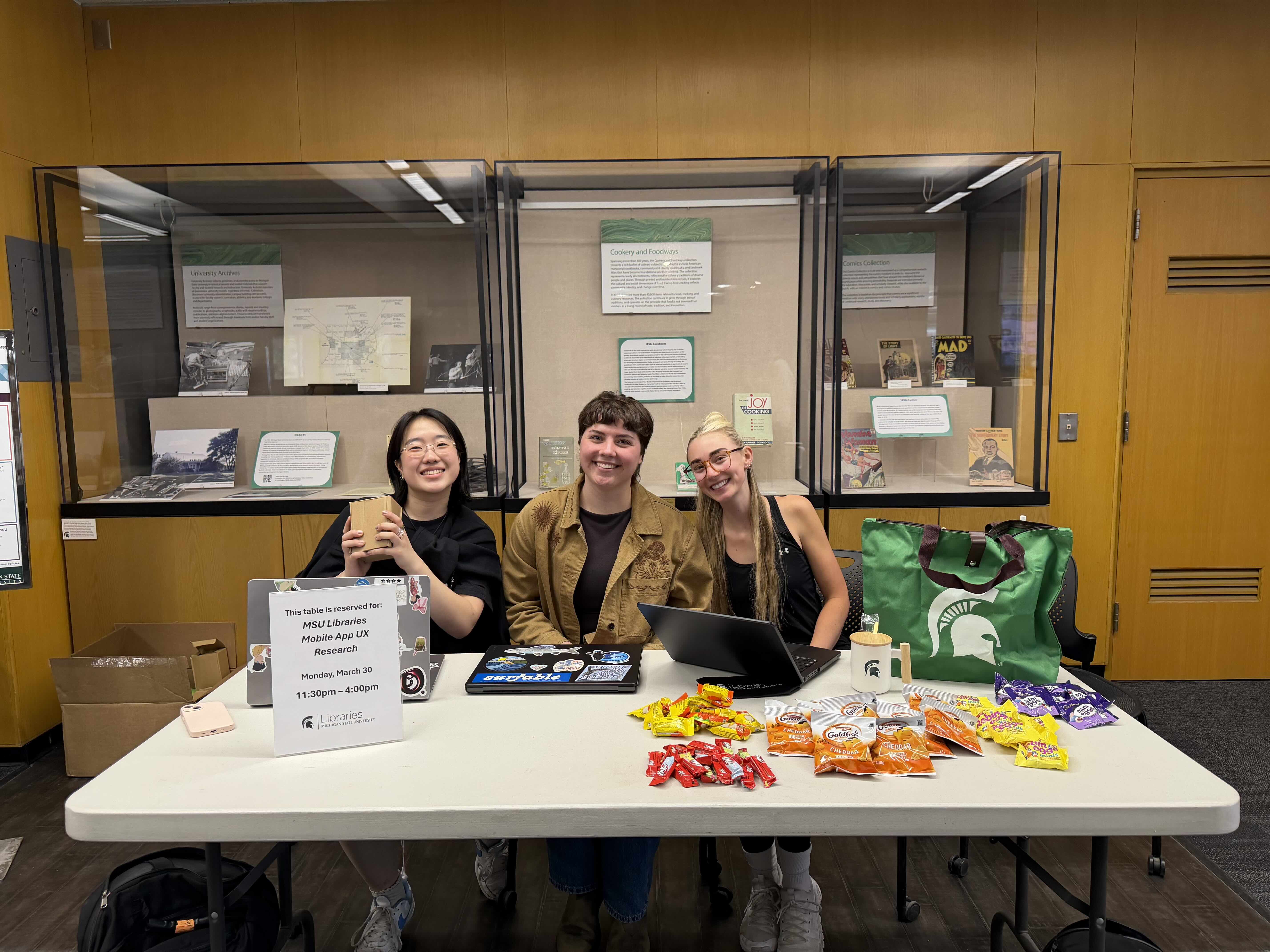
With a first draft of designs and a full prototype, it was time to test what we have made. So, the team packed up my car and we took a road trip to meet the students exactly where they will use the app — at the libraries!

We are lucky enough to live just an hour and a half from MSU's campus, so the team had the perfect opportunity to connect with our user base directly. We devised a dual phase study plan that utilized the ability to visit in person. Phase 1 revolved around our visit to the libraries, where the team set up a merch table and gathered survey responses and a handful of usability tests. Phase 2 was fully remote, and allowed for the team to gather additional data after making changes based on Phase 1 findings.
Across both phases, we used a mixed-methods approach that combined contextual data (survey responses and in-library observations) with task-based usability testing. This allowed us to evaluate both real-world relevance and interaction-level usability. By combining these methods, we ensured that our evaluation reflects both how students actually use the library and how effectively they can interact with the app to support those tasks.
Phase 1 consisted of in-person survey data collection and moderated usability testing conducted within the MSU Main Library. This phase allowed us to understand how students were actively using the library and identify usability issues within the prototype. We then made design changes based on these findings.
Phase 2 consisted of virtual moderated usability testing using the updated prototype. Participants completed the same tasks as those from Phase 1, which allowed us to evaluate whether the design changes improved usability and task performance.

Usability Test
Findings from the usability testing in Phase 1 revealed that users were generally able to complete core tasks such as booking a room and placing a hold on a book, which indicated that flows were functional. However, tasks involving navigation, labeling, and system understanding such as finding saved events, navigating between floors, and locating checked-out materials had lower success rates. Across tasks, common patterns of confusion included uncertainty about where to begin, difficulty interpreting interface elements, and reliance on visual cues (such as maps) in unintended ways. Phase 1 usability testing highlighted that improvements were needed to better align the interface with user expectations.
1 - Room Booking
"You are looking to book a room to study with your friends. Book a room on the 2nd floor of the library."
Statistics
Common Issues
Confusion with dropdown times and checkmark.
Unsure where to start when located on the homepage.
Design Updates
Rework the reserve flow to make choosing date and time more clear.
Add a quick action on the homepage that directs users to the reserve page.
2 - Event Booking
"You are now looking to go to an event at the library. Find an event that you have saved and register for it."
Statistics
Common Issues
Did not complete the user flow.
Did not navigate to the saved events.
Design Updates
Make the segmented control at the top larger to gather more visual interest
3 - Directory
"You are now looking to find what is available on the first floor of the library. Find which wing has study spaces. Then find where study spaces are located on the second floor."
Statistics
Common Issues
Users try to use the map as confirmation of study rooms.
Design Updates
Make sure the conditional variable changes work from all flows.
Hide map in a dropdown or make the overlay work better.
4 - Catalog
"You are looking to put a hold on a new book. Find a popular book and describe when you are first able to pick up the book. Then put it on hold."
Statistics
Common Issues
Users are not sure of the purpose of selecting a pickup time.
Design Updates
Remove the pickup time -> replace with a “pick up by this date/time notice.”
5- Account Status
"You are curious what books you currently have checked out. Find out what books you have checked out and read out their titles."
Statistics
Common Issues
People think that “My Library” is their current checkouts.
Design Updates
Have the “your library” populated with liked books.
Add subtitles to the books
Contextual Inquiry
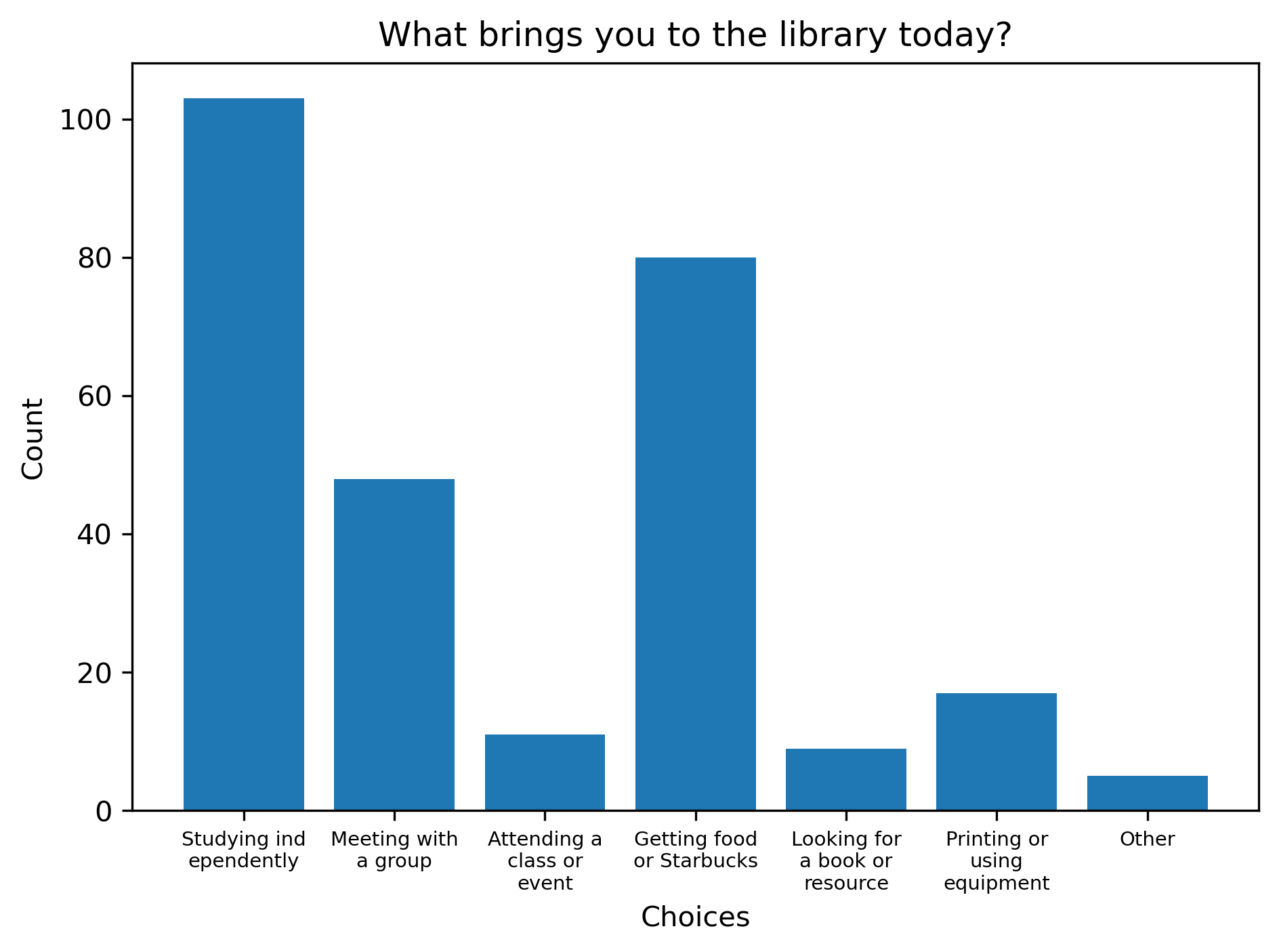
153 total respondents, all MSU students inside the Main Library.
"What brings you into the library today?"
This is meaningful because it reinforces that the library experience is highly task-driven and not centered around browsing materials which directly support our decision to prioritize features such as room booking, navigation, and quick access to services, rather than emphasizing catalog browsing.

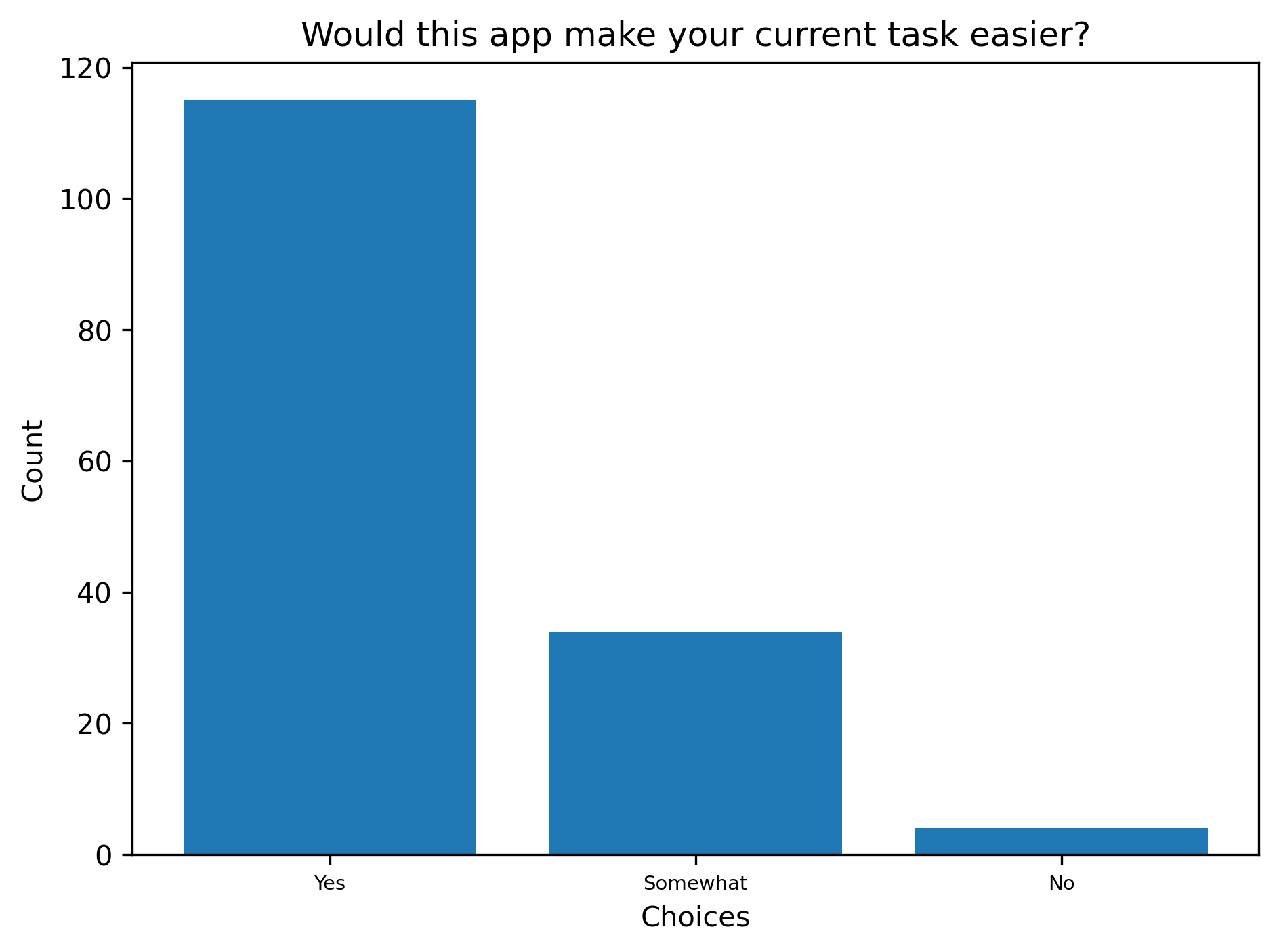
"Would this app make your current task easier?"
This demonstrates both immediate and overall value. Users not only see the app as helpful in completing specific tasks, but also perceive it as a useful tool for their broader experience.

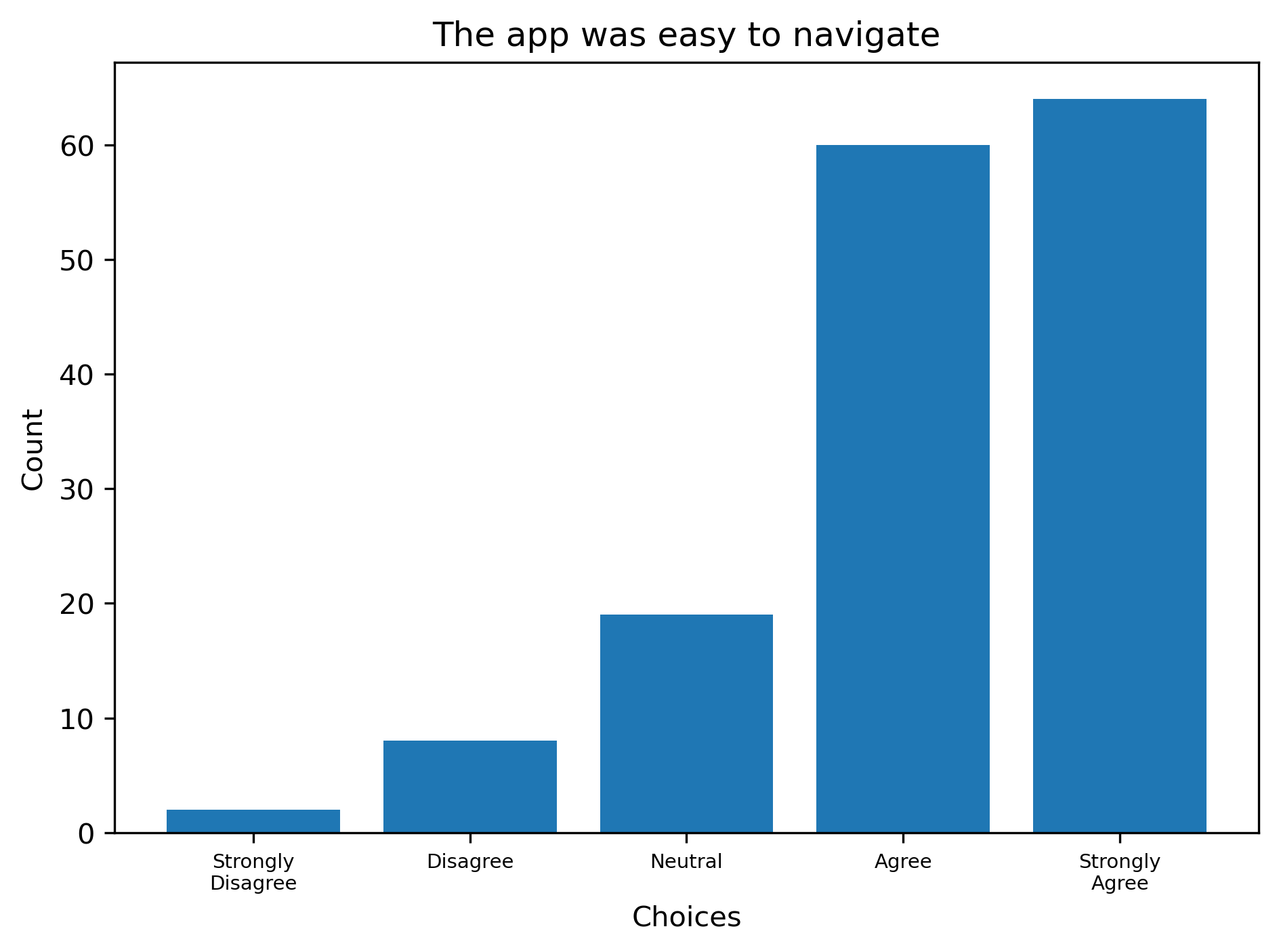
"Rate: The app was easy to navigate."
This indicates that users perceive the app as intuitive and easy to use. Strong usability ratings support the effectiveness of the app’s structure and information hierarchy, particularly for first-time or in-context use.

"What did you like about the app?"
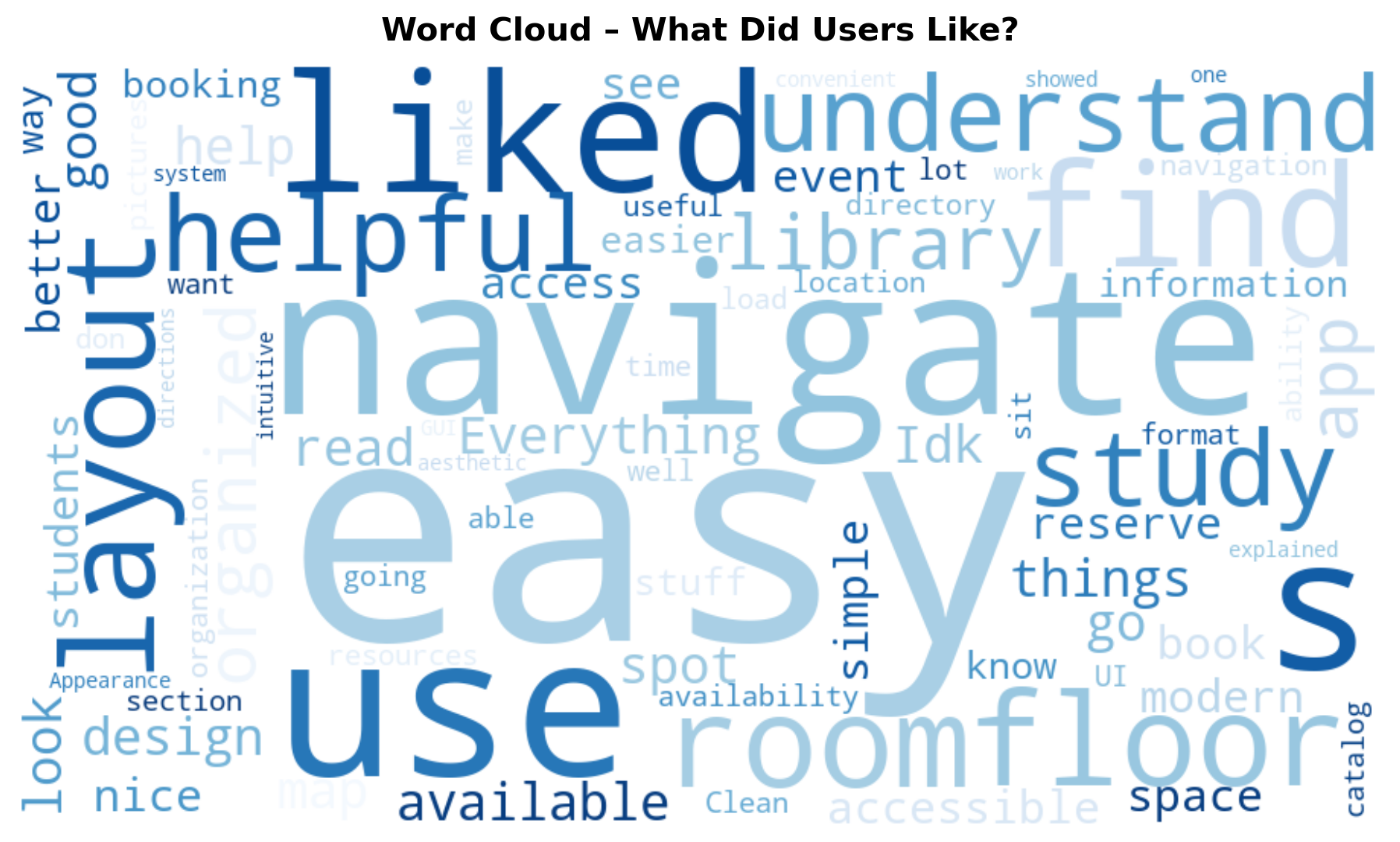
The word cloud highlights the most frequently used terms in open-ended responses. Words such as “easy” and “navigate” appear frequently, which lets us know that users found the app intuitive and straightforward to use. Additionally, “Starbucks” was a highly frequent term in suggested additions, which indicates interest in integrating related information into the app.

From the first phase of moderated usability testing and insights from our contextual inquiry, the team was able to update our mobile application designs based on common issues and user thoughts and wishes.
*Images are direct comparisons of HiFi v1 and HiFi v2.
Home Page Updates
The primary change is from a scrollable page to a static one. The information architecture has been rearranged to feature the most popular items students are using at the libraries. This change came from multiple sources. The client first notified us of this wish as they were looking for a change in information architecture, as our research data stated that room booking, library status, and the Starbucks were the main user focuses. Further, during the first round of usability testing, users found navigating the homepage difficult, and had many issues with finding the correct information from this page.

Catalog Page Updates
There were three primary changes made to the catalog page. The first was the inclusion of catalog type quick actions at the top of the page, the second was the inclusion of subtitles under the primary headings, and the third was the heart icons being filled within the user library. Many users had difficulties understanding what the “Your Library” section actually meant, and many users wrongly assumed that the section contained the books that the user had on hold or checked-out currently.

Reserve Page Updates
The primary change made on the Reserve page is the update of the filtration options to be more cohesive with the design system and with each other. Icons were introduced for more visual clarity. This change came from the first round of usability testing. Users had some difficulty undertaking the flow of booking a room, as each selection element had a different visual identity.

Confirmation Page Updates
The primary change made was updating the confirmation message to be a small overlay instead of a full static page. There is no longer a primary button making an action not feel required. The issue came from users not understanding that they could just leave the page without taking another action, as there was a primary button leading them to continue the flow.

Usability Test
Overall, there was a very strong increase in the completion of tasks. In the second usability test, there were 0 task failures.
1 - Room Booking
"You are looking to book a room to study with your friends. Book a room on the 2nd floor of the library."
Statistics
Common Issues
Navigates to directory instead of reservations.
Confusion with the verbiage difference of "Main Floor" vs "First Floor."
Design Updates
Update all cases of "Main Floor" to "First Floor."
2 - Event Booking
"You are now looking to go to an event at the library. Find an event that you have saved and register for it."
Statistics
Common Issues
Confusion with filler content not matching card content
Design Updates
No changes needed.
3 - Directory
"You are now looking to find what is available on the first floor of the library. Find which wing has study spaces. Then find where study spaces are located on the second floor."
Statistics
Common Issues
Navigated to “Reserve” instead of “Directory.”
Design Updates
Updated the user flow of the directory to include a way to navigate by category and by floor.
4 - Catalog
"You are looking to put a hold on a new book. Find a popular book and describe when you are first able to pick up the book. Then put it on hold."
Statistics
Common Issues
No issues noted.
Design Updates
No changes needed.
5- Account Status
"You are curious what books you currently have checked out. Find out what books you have checked out and read out their titles."
Statistics
Common Issues
Expected profile to be in the nav bar.
First navigates to saved books instead of profile
Design Updates
No changes needed.
From the second round of usability testing, the team was able to make note of some small changes to further increase the usability and reduce the confusion of the multiple actions in the mobile app. The primary change related to the Directory page.
Directory Page Updates
The primary change to this page is that of the dual approach to searching for things within the library. Previously, this primary directory page only had the ability to search for library content by floor. Our usability tests showed that users are more likely to want to look for something in the library and then find its location, instead of searching generally at the location to see what can be found there. Now, users are able to search for content both ways.

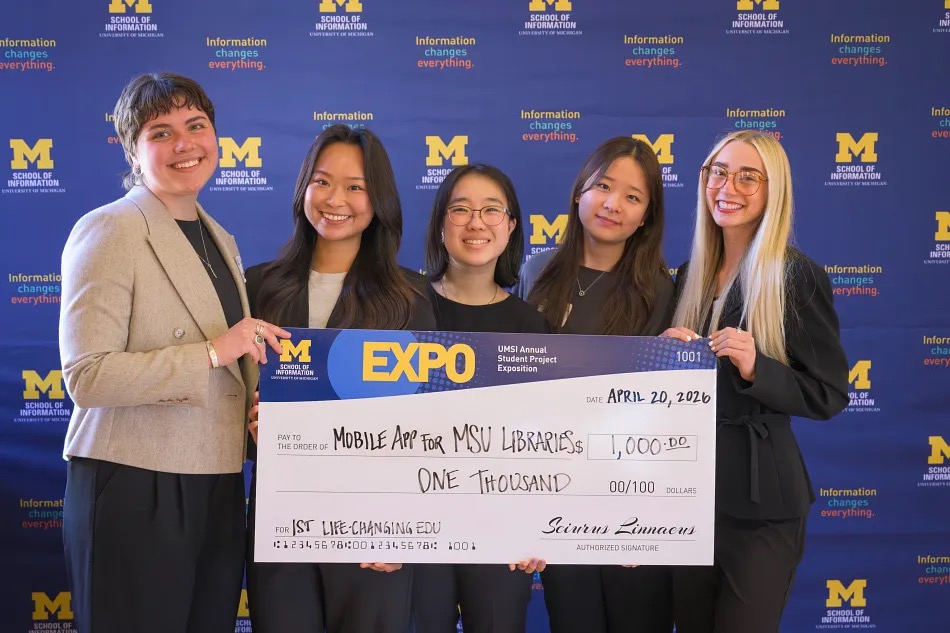
The UMSI Student Project Expo is the annual poster fair that showcases all of the projects completed by students through their courses, co-curricular programs, student organizations and independent endeavors. Students and student teams have the opportunity to win awards judged by industry experts and UMSI alumni. The 2026 project exposition had over 180 graduate and undergraduate teams across the entire program
Our team won first place in the category of Life-Changing Education with a $1,000 prize.

With the semester over and my graduation tassel turned, this project has been passed back over to the team at MSU Libraries. I cannot thank them enough for their support during this project, and the freedom of exploration they granted us. The library team has their own developers, and we expect the app to go live by the end of the year.
I am so proud of this project and the work that went into it. Go Green!